ZeScreenRuler is a free screen ruler which you can use in order to measure screen distances, area and even angles. Designers will be among those who’re gonna appreciate software like ZeScreenRuler the most because they probably find themselves in a lot of situations where they need to find out an image size, for example, or to measure how large the header for a website has to be, with ZeScreenRuler you can easily find out size and distances of everything on the screen.
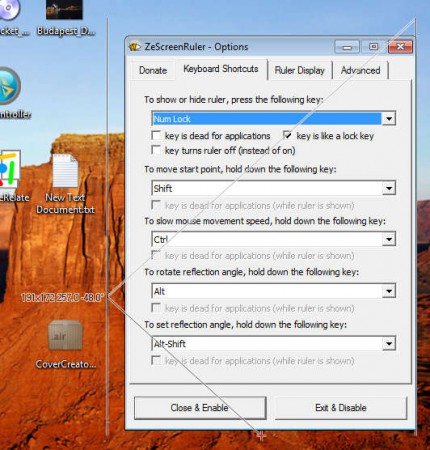
This free screen ruler application doesn’t have to be installed, when download is finished and when you click on it, it’s gonna start working right away. What you can see on the image above is the main configuration window of ZeScreenRuler, and the measuring box present around it, doing the measuring. There are three types of things which you can measure with the help of ZeScreenRuler:
- Angle – between the start point and the end point of course
- Rectangular areas – great for images and practically any square or rectangle
- Distance – again from the start point to the end point
It doesn’t take long to figure out how to use ZeScreenRuler, but at first it can be a little bit puzzling especially when you see that large measuring lines on your mouse cursor after starting the application.
Similar software: Dwarf, Free Screen Ruler, SmallMeasure.
How to measure distance, angles and rectangular area with ZeScreenRuler
Key element in the measuring process of the ZeScreenRuler would be the start point, which is the point from which all the measuring, except the area measuring, is gonna take place.
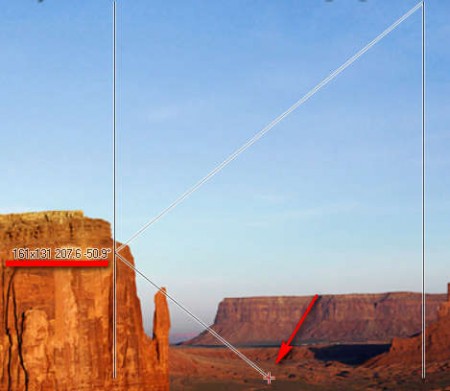
On the image above, the start point is the one being indicated with the red arrow, it’s in the shape of an plus sign. When you start moving your mouse around, start point will remain anchored while the rest of the measuring construction is gonna move around, and the numbers which are underlined above are gonna change their value. Reading the numbers is also something important that you need to know.
- First set of numbers – this is the size of the rectangle – Area
- Second number – distance between the start point and end point
- Third number – angle between the start point and the end point
End point is in the upper left corner of the measuring guides, while the two vertical lines which can be seen on both of the images above are used to measure area, rectangles, squares and everything in between can be measured. Start point is moved by holding down the Shift key on the keyboard, the shortcut can be configured in the application config window.
Conclusion
If you’re in need of a very advanced screen ruler with which you can measure distances, angles and area, then ZeScreenRuler is just the thing you need. This is a free application which doesn’t have to be installed and it’s very lightweight. You might need a few moments to get used to how the screen is measured with the help of ZeScreenRuler, but you should be able to create precise screen measurements, which is more that worth figuring ZeScreenRuler out.
