• Home
  • Software Testing Service
  • About US
    • Privacy Policy
    • Disclosure
  • Write For Us
  • Submit Software
  • Contact Us
    • Subscribe
I Love Free Software
Best free software available all over the web. The free software categories include Windows Software, Social Networking Tools, and software installation videos.


  • Featured
  • Windows
  • Web Applications
  • App Store
  • Android
  • iPhone
  • iPad
  • Windows 8
  • Social Networking
  • Programming Tools

Modify Right Click Menu with Right Click Enhancer

By Ishayat on June 10, 2011 | Sponsored Links

Right Click Enhancer is a free system utility that allows you to modify right click menu in the way you want. We use the right click menu everyday so it will be really great if we can edit the right click menu in the way we want and Right Click Enhancer helps you to do just that. You can add some good stuff in your right click menu to make it more useful. You can add folders or files to your right click context menu to get quick access to them.

This free system utility also works as a right click tweaker. All the tweaks are quite useful and it will make your everyday work easier. You can create or print file list, encrypt and decrypt, copy or move to folder, open files in Notepad or do some other useful stuffs just by tweaking. You can also open an administrator command prompt from any folder just by performing right click on it. When you want to copy or move a file, you don’t have to go directly to the place where you want to paste them as you can directly go their from the right click menu.
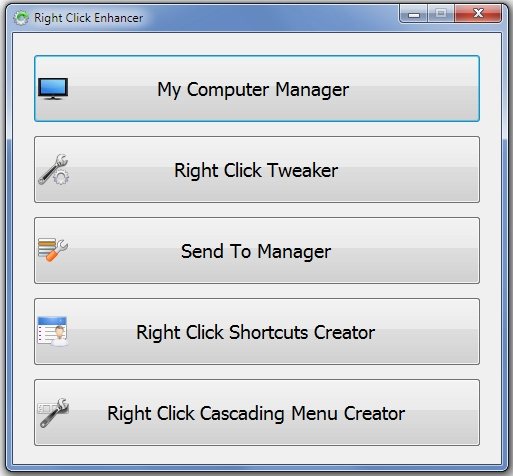
Right Click Enhancer
Sponsored Links

This free system utility is available in two different versions, main version and portable version. Both of them are available for download at Right Click Enhancer’s official website. This free system utility can be also used as My Computer Manager, Send to Manager and Right Click Cascading Menu Shortcuts creator. You can add files or folders to My Computer, Desktop or Control Panel with My Computer Manager. You can add folders to your send to menu with Send To Manager.

If you want to encrypt files with just one right click, you can try Right Click Encrypter and Crimson128. If you want to hide desktop icons with just one click, you can try EmptyDesk.

Here is a video overview of Right Click Enhancer:

YouTube Preview Image

Features of Right Click Enhancer:

  • Copy & Move to Folder: When you click on these options from the right click menu, you can browse any place on hard disk where you want to move or copy the folder or the file.
  • Encrypt & Decrypt: You can decrypt and encrypt your files or folders with just one right click. Moreover, those encrypted files can’t be used by another user on your PC.
  • Open in Notepad: You can open a file directly in Notepad with just one right click.

Download Right Click Enhancer Free.

Home Page: Click Here
Works With: Windows 7, Windows Vista, Windows XP
Free / Paid: Free

Link to This Page:


You Might Also Like:

  1. Free Software To Modify Right Click Menu
  2. Modify Right Click “Send To” Menu using SendToSendTo
  3. Modify “Send To” Right Click Option: Send To Toys
  4. Crimson128: Encrypt Files From Right Click Menu
  5. Add Favorite Folders To Right Click Menu: Folder Guide

Be the first to know about Latest Free Software:

  • Join us on Facebook
  • Subscribe to our RSS Feed
  • Follow us on Twitter
  • Subscribe to Email Updates:

Posted in Desktop Enhancement | Tagged context menu, free system utility, Right Click Enhancer, system utility | Leave a response

Ishayat

« Previous Next »

Featured Posts

  • 5 Free Snippet Managers To Manage Code Snippets
  • 5 Free Online Tools To Test Website In Different Resolutions
  • 5 Free Microsoft Access Alternatives
  • 5 Free IP Notifier Apps
  • 5 Online Mapping Websites
  • 5 Free Alternatives To iGoogle
  • 7 Websites To Download Windows 8 Themes
  • 5 Best Free Calculator Apps For Windows 8

Join More than 15,000 Followers!

Enter your Email Address
  • Submit Software
  • Software Testing Service
  • Write For Us
  • About Us
  • Privacy Policy
  • Disclosure
  • Contact Us

Link to Us:

Did we review your software here? Feel free to flaunt this badge on your website:

Free Software

Use this Code:

Copyright © 2013 I Love Free Software.

Powered by WordPress and Hybrid. New - H