I run this website on WordPress, and had been trying to figure out how to setup automatic scheduled backups of my WordPress website. WordPress backup basically involves 2 steps:
- Backup the MySQL database
- Backup the WordPress files (in your wp-content folder).
I was discussing this with Rarst a few days back, and he suggested a nice strategy to automate the backup of both of these.
Backup WordPress Files:
To schedule automatic backup of WordPress files, a very easy way is to use freeware Cobian Backup. With Cobian, you can configure which folders of your WordPress blog you want to backup, set the frequency of backup, and what type of backup to do (Full / Incremental). At the scheduled time, Cobian Backup connects with your WordPress website using FTP, and downloads the files to your specified location on your machine.
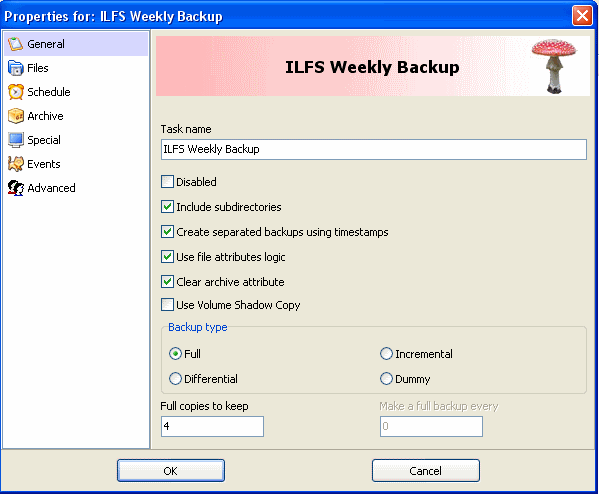
I have set it up to backup my WordPress website every week, and it has been working without a fail.
To make sure that I don’t lose my backups in case my system crashes, I have configured Cobian to copy the WordPress backups to my Mozy folder. This ensures that a copy of my backups is saved online as well. You can use Dropbox also, instead of Mozy. Check out this post for detailed steps to setup Cobian.
Backup WordPress Database:
A very easy way to backup your WordPress database is to just use the “Export” option under Tools in your WordPress panel. However, that is quite a manual activity, and not automated. There are a few plugins available that completely automate the backup of your WordPress database. The one that I am using is “WordPress Database Backup“. This has very easy to use options. After installing this plugin, you can schedule the frequency of backup. Then, you specify the email address at which your database backup should be sent. After this, you will start receiving your WordPress database in your email at your speficied frequency.
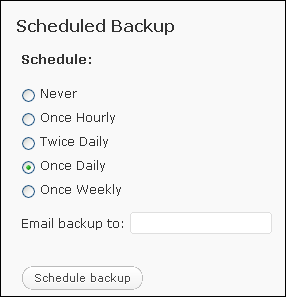
I have setup my wordpress database backup on a daily basis, and I get it in my email everyday.
Both the steps above are very easy to configure, and have been working well for me. If you know of some alternate approach, do mention that in comments.