Here, is a quick tutorial to wirelessly access Android data from PC browser. Accessing Android data from PC is a very easy process when you have USB cable connected to your Android and PC. Earlier we have also discussed about Wirelessly accessing Android data from PC browser with AirDroid app. This time we have found one more way to wirelessly access Android data from PC browser through WebSharingLite app for Android.
With WebSharingLite app, you can easily connect your Android data wirelessly to your PC and access the data via your PC browser. I am discussing this second way to wirelessly access Android data from PC browser because I truly liked WebSharingLite app for its speed and simplicity. Downloading and uploading data between Android and PC becomes very easy and convenient with WebSharingLite app.
Steps To Wirelessly Access Android Data From PC Browser:
Step 1: Download and install WebSharingLite app from our App Store or you can scan the QR Code below. You can also head to Google Play Store to download WebSharingLite app on your Android phone.

Step 2: Connect your PC and Android phone on a same Wi-Fi network.
Step 3: Launch the app on your Android.
Step 4: Tap on start button to activate the app and create a unique URL for your PC browser.
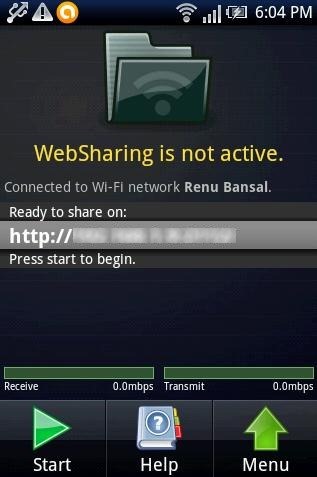
Step 5: Type the unique URL on your PC browser.
Step 6: Along with creating a unique URL, the Android app also creates a unique password to access the data.
Step 7: Now, type the password on your PC browser where you have accessed the unique URL.
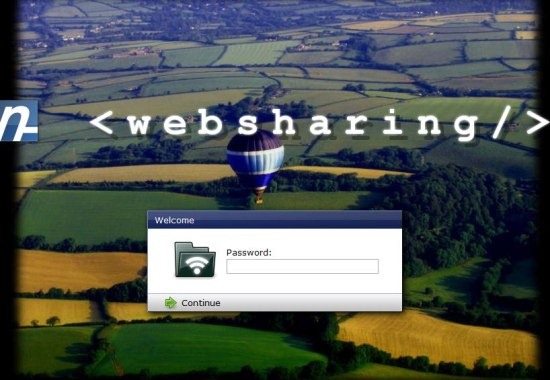
Step 8: You will then see all the files and folders which are saved on your SD card will be imported on your PC browser.
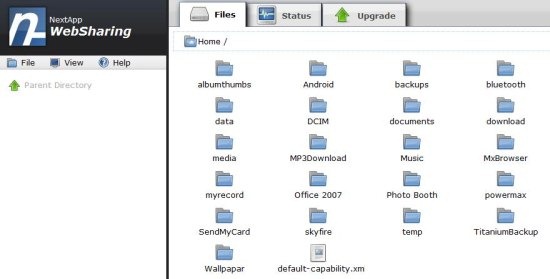
Step 9: You can then select any one of them and access it on your PC browser.
The good part of WebSharingLite app is that, you don’t need to install any special program on your computer. Just access everything simply on your PC browser.
Apart from accessing the files and folders of your Android phone, you can even transfer the file from Android to PC or vice-versa. Also, you can manage other options; like wirelessly deleting a file or folder, rename the folder, create a new folder, and more. You can even check the status of your Android system on your PC like battery meter, Wi-Fi signal, memory card usage, and processor usage.
You can even wirelessly transfer data between multiple Androids and PC.
