Ybex Clipboard is free software used to capture screenshots, and share computer screen with your friends and family. It is a web based screen sharing application and with the help of this software you can annotate the screens and share things like images, texts etc. Using this program you can securely share the screen. You will also be able to modify and restructure the screen within the program.
If you want you can share the screen directly with a remote user. Otherwise you can upload this on the internet for the public viewing. If it is public sharing anyone can see the content you are sharing. You must be sure of the screen you are sharing publicly. However, you could share it privately also on the web. You are the one to decide how you want to share it. Some other screen sharing applications we reviewed earlier include Microsoft SharedView, Join.Me, and free web conferencing software.
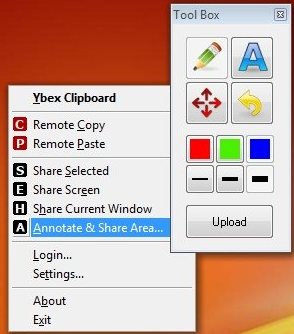
How to Share Screen with Ybex Clipboard:
The basic usage of this free screen sharing software is really simple. You will be able to handle the program very easily without going through user’s manual. You can download the client program from the web and install it on your machine. You will be able to access it on your system tray once started. However, you need to register it for the first time. You will be asked to register with an email id and password. Upon starting you will have to enter the user id and password you have just secured.
When you are working on other applications you can access Ybex Clipboard with the hot key Ctrl+Shift+Y. This hot key will open the main menu. On the main menu you will spot 5 buttons. You will find a button namely ‘A’ with which you can select any area on the screen. You will find other hot keys as well for the rest of the operations.
You can make use of the tool box to add shapes, texts and annotations on the screen. You can use the default copy and paste windows commands to place the captured screens anywhere you want. You can use the upload button to upload the screen to a web location. After uploading you will have the web link of the uploaded location. You will be able to copy and paste between computers using Ybex Clipboard.
Ybex clipboard is one of the easiest to use screen sharing applications that I have come across. It might not have advanced features, but it is great for home users to quickly share screen with friends and family.
