FileSync is a free backup software, automating the process of transferring carbon copies of your computer’s files onto another storage drive of some kind so as to create a safety net in the event of your hard drive or computer going wrong somehow.
FileSync is another great program from the Void Realms company, makers of many of the other excellent freeware programs we have reviewed, like, Easy Encrypt, and Plain Sight.
Here are some of the uses of FileSync:
- Copy information of one hard drive to another hard drive. You can also use Drive Dumper to clone your disk.
- Copy data of one computer to another computer.
- Store data on an external hard drive
- Backup data onto a shared network folder or drive
- Synchronize multiple computers, like synchronize your laptop with your netbook.
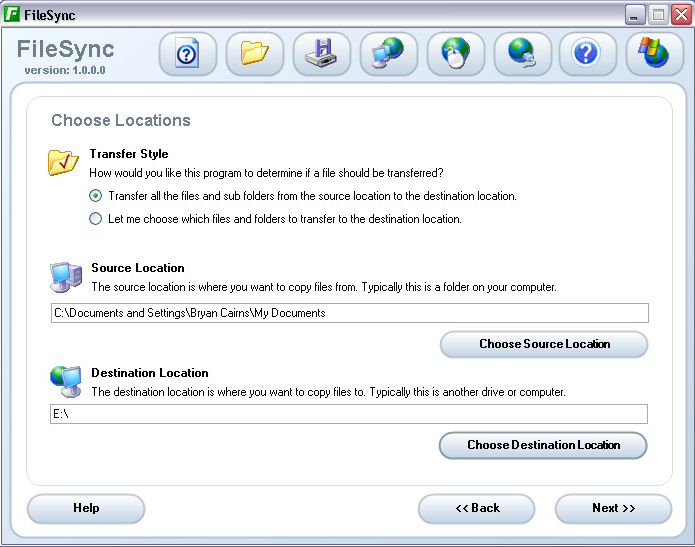
Configure Backups as Projects
For me, the feature that sets FileSync apart from other free backup software is the fact that you can create “projects”. A project is a backup routine, meaning that you can set up this routine the long-winded way once and then you can simply run the project when you want to do the same backup again. This is very useful for those who have important information that needs to be backed up regularly.
Here are some of the features of FileSync:
- User friendly.
- Integrated help system.
- Completely user controlled copying process.
- Transfer any number of files (from single item up to whole drive).
- Source location can be any drive connected or networked to the computer.
- Destination location is similarly flexible.
- Designed to handle both small and large amounts of data.
- Projects can be saved. Good for repeat backups.
Other Thoughts:
Another thing I found particularly appealing here was that the process of transferring the information is swift and efficient, regardless of whether I am trying to send over one document or a whole drive’s worth of data. This kind of flawless reliability is exactly what we need to see in free backup software. We do not want to be using the kind of software that regularly breaks for our regular and very necessary file backups. Another easy to use backup software is StorThing.
Thus, FileSync is an excellent piece of free backup software that continues Void Realms’ string of good reviews on this site. If you are looking for free backup software, FileSync is a very safe bet indeed.
