Viddy is a free iPhone app to capture videos and add different effects to it. You can now modify video and add different effects to it. Make your video funny by adding different Muppets to it. Just create your own masterpiece with this great app “Viddy” to edit videos on iPhone. This application adds awesome and funny video effects in videos. Also this intelligent app gives its own sound effect to the video as to make it more funny and interesting. In addition you can share your beautiful videos created with the world. Viddy has its own community with which you can share your videos and also those videos can be shared via Facebook, Twitter and YouTube. The main drawback of this app is that, the video length is currently limited to 15 seconds. You can upload and edit videos only up to a length of 15 sec or less. Apart from this Viddy is an awesome app to work upon.
You can check out Video Trimmer App for Android reviewed by us.
Some Key Features Of Viddy To Modify And Edit Videos:
-
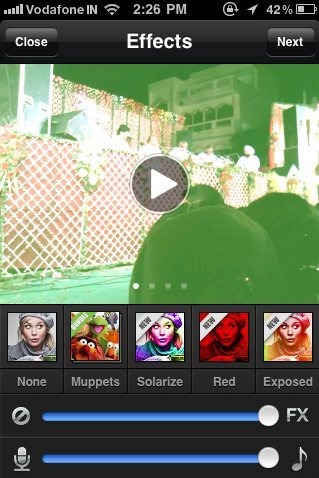
Add effects, Muppets, music, transitions and many more with Viddy.
-
Edit videos by giving effects to video like Vintage, Red, Glam, Crystal, Solarize, Exposed, BW and the like.
-
You can share your creation with the world and also via Facebook, Twitter and YouTube.
-
You can also like a video, comment or tag any of your friends in the video.
-
Also record a video from phone’s camera and give effects to that video in real-time.
-
Records a video up to a video length of 15 sec.
-
Sign up with Viddy to make your own account.
-
Edit your profile anytime and add your photo in your profile.
-
Check number of followers and followings from the app.

-
You can invite friends.
-
Also check out popular, trending and newest videos uploaded by app. You can also share those videos in the app gallery.
Also check out YouTube Video Editor for desktop reviewed by us.
How To Install Viddy App To Edit Videos:
-
Just login “App Store” or Scan the QR Code below.

-
Click on “Search”. Type “Viddy” in search tab.
-
Click on “Viddy”.
-
Click on “Install”.
The free Viddy app to modify and edit video will be automatically installed. Now just modify videos on your smart phone and share them with the world. Give different effects and make them different, beautiful and funny.
