beeZee is a free Android app to auto reply SMS and missed calls when you are busy. This Android app is specially for those who are mostly busy in their daily activities and can’t pick the phone or read SMS at some particular point of time.
The app lets your Android automatically reply to missed calls and unread messages in the form of text message. You just have to set a particular status whether you are in gym, in office, at some work, driving, in hospital, or some other status of your choice. Now, the app automatically sends the text when you miss to pick a call or against any pending or unread message.
The charges of the SMS will be standard as provided by your service provider. If the messages are provided for free by your service provider, then it will be sent for free and if the messages are chargeable, then it will be charged as per the standard charges.
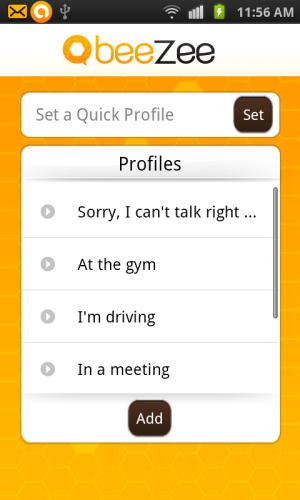
With beeZee app, it becomes truly convenient to manage your missed calls and unread messages. Now, you don’t have to worry about picking up the calls when you are driving, as the caller would know that you are driving and can’t pick the call. Along with the status, the app also allows you to stick a message of your choice, so that it becomes more clear by explaining your status. The app will automatically sends status along with message in one single text.
Also, the app plays an great roll in case your partner calls and you are unable to pick the call. You can fearlessly call back your partner at any point of time without giving a fair statement in support of the reason for not picking up the call. Your partner will know where you were and the reason for not picking up the call. No more cribbing!
Go Ahead And Set Busy Status With beeZee App:
Step 1: Download and install beeZee app on your Android phone.
Step 2: Launch the app.
Step 3: Select any one status profile or create a new status profile if you don’t find in the status list.
Step 4: Now, select the time gap between which you will be busy.
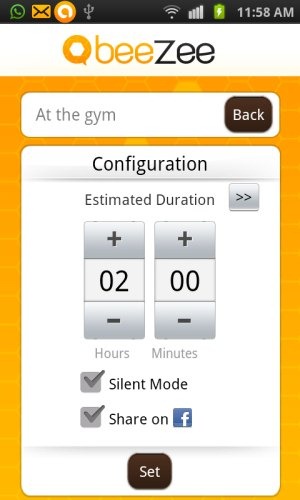
Step 5: Tap on the option menu and then tap on settings button in the options menu.
Step 6: Select the appropriate settings and you are all set.
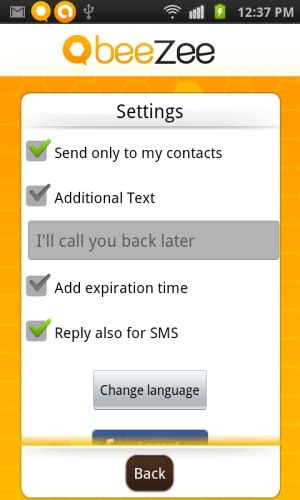
Step 7: Now, you will see the app activated with the notification of active app in status bar.
Step 8: Whenever, you miss to pick a call or miss to reply to SMS, the app automatically replies in the form of a text only between time gap which you have set.
Key Features Of beeZee App To Auto Reply SMS And Missed Calls:
- Auto reply to missed calls and SMS on your Android.
- Update status along with a custom message and set a default message to reply SMS and missed calls.
- Set the time of your busy hours so that the app works accordingly.
- Turn your Android phone automatically on silent mode till the time you are busy.
- Auto reply to SMS is optional.
- Share beeZee status on your Facebook account. (I tried this option to share the status to my Facebook account, but for some reason the status didn’t update.)
- Easy to use interface.
Note: If you are using Handcent SMS app or Go SMS app, then uncheck “disable other message notification” option in the settings menu. Only after unchecking the option, beeZee app will work on your Android phone.
Install The App:
Click here to install beeZee app from our App Store or you can scan the QR Code below. Head to Google Play Store, if you want to search and install beeZee app from Google Play Store on your Android phone.

Downloading and installing beeZee app makes your works easier by keeping your Android away from you when you are busy. Make you callers feel that you are every time alert and respect their incoming calls and SMS. Instantly reply them with your Android phone automatically.
You can also check out complete review on Voicemail Chimp app for Android to send SMS when busy.
