• Home
  • Software Testing Service
  • About US
    • Privacy Policy
    • Disclosure
  • Write For Us
  • Submit Software
  • Contact Us
    • Subscribe
I Love Free Software
Best free software available all over the web. The free software categories include Windows Software, Social Networking Tools, and software installation videos.


  • Featured
  • Windows
  • Web Applications
  • App Store
  • Android
  • iPhone
  • iPad
  • Windows 8
  • Social Networking
  • Programming Tools

BrowserProtect: Prevent Browser Hijack

By Mayank on November 5, 2010 | Sponsored Links

BrowserProtect is a free add-on to Mozilla Firefox which protects web browser from being hijacked. Now what I mean by hijacking is that this freeware monitors the configuration of your web browser from all malware related and other suspicious activities that attempts to hijack your homepage and alerts you if any program tries to hijack your browser i.e. any activity which tries to change your homepage or search engine. Other safe browsing software that you can also try are: Comodo Dragon Browser, proXPN, and GeSWall.
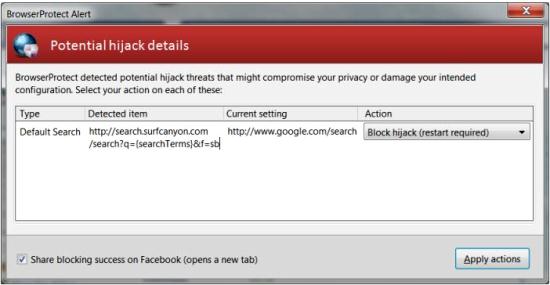
BrowserProtect
Sponsored Links

Today with advancement in technology not only malware hijacks homepage and search engine configuration but trusted programs also are trying to change the browser’s homepage and search configuration. What these programs do is they install toolbars on the web browser interface and then change the browser’s homepage and search engine thereby hijacking your web browser. So by adding this add-on, BrowserProtect to Firefox will really help in protection from hijacking of web browser. Cool add-on isn’t it? Now let us see how this add-on works for Firefox:

This free add-on to Firefox uses a whitelist approach. BrowserProtect consists of a list of search providers and homepages and whenever any activity changes their values to something different which is not present in the list of BrowserProtect will be blocked by this freeware. A notification will be on the screen of the user to change the setting. However if user allows to change settings then the settings will be changed but generally it is not preferred. New search engines and homepage can be added to whitelist if they are not related with suspicious activity related to hijacking of browser. So this add-on, BrowserProtect is a must for all Firefox users to protect their web browsers from all malicious activities.

Home Page: Click Here
Works With: Firefox
Free / Paid: Free

Link to This Page:


You Might Also Like:

  1. History Deleter: Delete History of Specific Websites
  2. A-Squared Hijack Free: Free Software to See System Info
  3. QT Web Browser – Portable Free Web browser for Private Browsing
  4. Download Lunascape: Extremely Fast Web Browser
  5. TheWorld – Free Web Browser Based on IE Engine

Be the first to know about Latest Free Software:

  • Join us on Facebook
  • Subscribe to our RSS Feed
  • Follow us on Twitter
  • Subscribe to Email Updates:

Posted in Plugins | Tagged firefox plugin | Leave a response

Mayank

« Previous Next »

Featured Posts

  • Top 7 Free Launchers for Android
  • 5 Free Snippet Managers To Manage Code Snippets
  • 5 Free Online Tools To Test Website In Different Resolutions
  • 5 Free Microsoft Access Alternatives
  • 5 Free IP Notifier Apps
  • 5 Online Mapping Websites
  • 5 Free Alternatives To iGoogle
  • 7 Websites To Download Windows 8 Themes

Join More than 15,000 Followers!

Enter your Email Address
  • Submit Software
  • Software Testing Service
  • Write For Us
  • About Us
  • Privacy Policy
  • Disclosure
  • Contact Us

Link to Us:

Did we review your software here? Feel free to flaunt this badge on your website:

Free Software

Use this Code:

Copyright © 2013 I Love Free Software.

Powered by WordPress and Hybrid. New - H