Subtitle Edit is a free subtitle editor software which allows you to edit subtitles. With the help of Subtitle Edit you can create/ adjust/ sync/ translate subtitles lines. It acts as a subtitle editor. It has a new wave form control. Video player uses direct show or VLC media player. It is an editor for movie subtitles. With the help of Subtitle Edit you can easily adjust the start time of any subtitle which is not synchronized with the movie. It adjust all subtitles time and acts as a visual translation helper.
Subtitle Edit is a free software which is released under general public license. It can transform, edit, correct or refine existing subtitles. This program also shows sound waves which makes it easier to synchronize subtitle to voices. It is easy to use and has multiple document interface. It has many options option which makes it really simple and its use simple like undo/redo option, drag and drop option, it can be used for timing, can be used for translating and many more. Another subtitle editor we reviewed earlier is Subtitle Workshop.
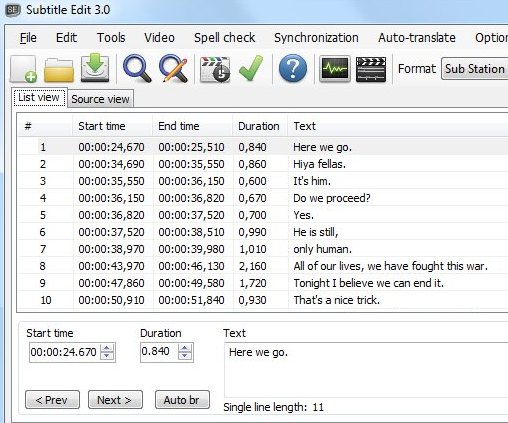
Some of the features of Subtitle Edit which makes its working efficient are:
- It can create/adjust/translate subtitle lines.
- It can visually synchronize/adjust the subtitle.
- Auto translation with the help of Google translate or Microsoft translate.
- It Is easy to rip subtitle from a decrypted DVD.
- It can adjust display time and can merge/split.
- It can fix common error wizard. It also has internationalization support and has video player integrated with the main window.
- It can change casing using names directory.
- It has an option of multiple search and replace. It has various option of style editor, spell checking.
- It can also even compare subtitles. It can be used form timing and can generate and display key frames.
- Subtitle Edit is available in many languages. Some of them are English, Danish, French, polish and many more.
In visual synchronization mode you can match one of the first subtitle with correct scene, and one of the last subtitle with correct scene, and then press sync. Now you will see that subtitle and movie matches. Subtitle Edit is even awarded with many awards. Some of them are best freeware download, soft 82 award, it also have 5 start rating. Also check out some media players that show subtitles, like, GOM Media Player and BS.Player.
So check the new and latest version of Subtitle Edit and subtitles to your videos and enjoy maximum features making your video better.
