• Home
  • Software Testing Service
  • About US
    • Privacy Policy
    • Disclosure
  • Write For Us
  • Submit Software
  • Contact Us
    • Subscribe
I Love Free Software
Best free software available all over the web. The free software categories include Windows Software, Social Networking Tools, and software installation videos.


  • Featured
  • Windows
  • Web Applications
  • App Store
  • Android
  • iPhone
  • iPad
  • Windows 8
  • Social Networking
  • Programming Tools

Contacts Backup For Android

By Lalit Aggarwal on November 3, 2011 | Sponsored Links

Contacts Backup for Android is a free app that creates a backup of all contacts in the Android phonebook. Never lose your contacts information with this Contacts Backup For Android app. This free contacts backup app creates a Text or CSV file which contains all your phone contacts. You can then print or save the Text or CSV file created as online backup or you can email this file to yourself so that you never lose your contacts.

Contacts
Sponsored Links

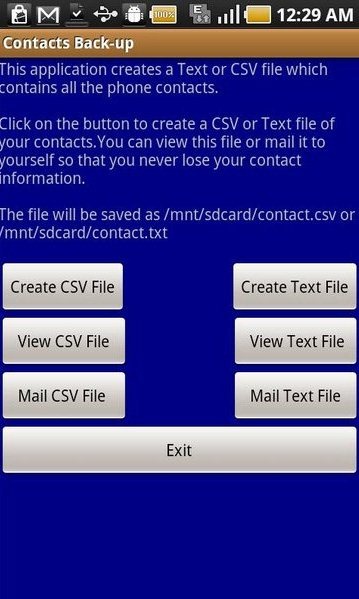
With this Android contacts backup app you don’t need to worry about losing your contacts from your phone while formatting it. Just format your phone after creating a copy image of your contacts as Text or CSV file. I really liked this contacts backup for Android app because the app saved all my contacts. As I recently formatted my smartphone because it was creating some start issues. The only negative point of this Contacts Backup For Android app is that it doesn’t import the contacts back to the phone. Lets us take a look at the screenshot of homepage of the app:
Contacts2

iPhone users can check out iPhone Backup Extractor for data recovery on iPhone reviewed by us.

Some Key Features of Contacts Backup for Android App:

  • You create the backup of your contacts in the form of a CSV File.
  • You can also view that CSV file anytime.
  • It also provides you the feature to email the CSV file to your mail id or any other mail id.
  • You can also create the backup of your contacts in the form of a text file instead of CSV file.
  • You can view that created Text file anytime.
  • You can email that text file to your mail id or any other mail id.

Also check out Google Takeout, the Free Backup of Google Account Data reviewed by us.

How To Install Contacts Backup for Android App:

  • Just login to “Android Market”.
  • Click on “Search” Tab. Type “Contacts Backup By Hemant” in the search tab.
  • Click on “Contacts Backup”.
  • Click on “Install”.

The free Contacts Backup for Android app will be automatically installed. Now have all your contacts saved on your mail and be safe from losing your contact information.

Home Page: Click Here
Works With: Android 2.2 or later
Free / Paid: Free

Link to This Page:


You Might Also Like:

  1. iPhone Contacts Backup App to Backup Contacts to Excel
  2. How To Backup Contacts, Messages And Call Logs On Android
  3. Backup Android Data in Cloud: Contacts, Messages, Documents
  4. Backup iPhone Contacts to PC: CopyTrans Contacts Free
  5. 5 Free iPhone Contacts Backup Apps

Be the first to know about Latest Free Software:

  • Join us on Facebook
  • Subscribe to our RSS Feed
  • Follow us on Twitter
  • Subscribe to Email Updates:

Posted in Android | Tagged android, contacts, csv file, free backup, phonebook | Leave a response

Lalit Aggarwal

« Previous Next »

Featured Posts

  • 5 Free Snippet Managers To Manage Code Snippets
  • 5 Free Online Tools To Test Website In Different Resolutions
  • 5 Free Microsoft Access Alternatives
  • 5 Free IP Notifier Apps
  • 5 Online Mapping Websites
  • 5 Free Alternatives To iGoogle
  • 7 Websites To Download Windows 8 Themes
  • 5 Best Free Calculator Apps For Windows 8

Join More than 15,000 Followers!

Enter your Email Address
  • Submit Software
  • Software Testing Service
  • Write For Us
  • About Us
  • Privacy Policy
  • Disclosure
  • Contact Us

Link to Us:

Did we review your software here? Feel free to flaunt this badge on your website:

Free Software

Use this Code:

Copyright © 2013 I Love Free Software.

Powered by WordPress and Hybrid. New - H