• Home
  • Software Testing Service
  • About US
    • Privacy Policy
    • Disclosure
  • Write For Us
  • Submit Software
  • Contact Us
    • Subscribe
I Love Free Software
Best free software available all over the web. The free software categories include Windows Software, Social Networking Tools, and software installation videos.


  • Featured
  • Windows
  • Web Applications
  • App Store
  • Android
  • iPhone
  • iPad
  • Windows 8
  • Social Networking
  • Programming Tools

Virtual Disk Utility: Virtual Disk Drive to Secure Data

By Ishan Bansal on August 1, 2010 | Sponsored Links

Virtual Disk Utility is a free computer software for securely managing your data. It creates a virtual space on your hard drive that appears as another drive, just like a USB drive. You can encrypt and password protect this virtual disk space so that all the data stored on this is completely secure.

One of the good things about using this Virtual Disk utility is that it can be used on both Mac and PC for better cross-platform preservation and protection of data. This program can manage data securely and safely. It is easy to install, mount, disconnect or create virtual drives for storage of data. These can be undone with just a click of the mouse.

Encryption is easy by using a password phrase to further secure the data on the drive. This is an excellent way to preserve and protect data from being compromised. Removal is also easy to do.

Other free software to password protect your files are Conceal, Secret Disk, and My LockBox.

Sponsored Links

The best part is that you can take your virtual disk from one system to another. You can even take it from PC to Mac (or vice versa). As your data grows, Virtual Disk Utility automatically grows in size. This ensures that it occupies only required space on your hard drive.

How to use Virtual Disk Utility:

Using the Virtual Disk Utility is easy to do. Simply install the free computer software on your hard drive. Then run the program. You can interact then with the virtual drive and when you are finished eject it.

It is mounted as a drive with a letter in Windows and shows up under the Devices list in Mac. This program is compatible with Mac, Windows XP, Vista and Windows 7. The system also has an intuitive interface that makes it easy to protect your data. This program will expand and contract so that it makes effective use of storage.

Features of Virtual Disk Utility:

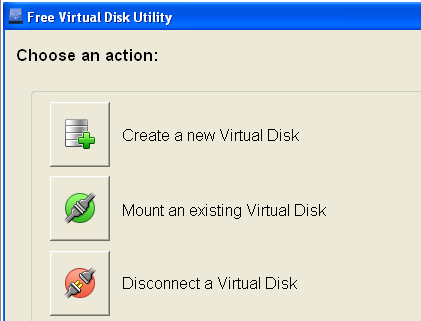
  • UI makes it easy to disconnect, create or mount virtual drives
  • Data can be secured with the use of a passphrase and optional encryption
  • Installable on both Mac and PC
  • Drives can be unmounted or mounted with the click of a mouse.

Virtual Disk Utility comes from the makers of Secure Browser.

Home Page: Click Here
Works With: Windows 7, Windows Vista, Windows XP, Mac OS X
Free / Paid: Free

Link to This Page:


You Might Also Like:

  1. Create Encrypted Virtual Drive to Secure Files: Klonsoft LockDisk
  2. Protect Me: Free Software to Password Protect Data
  3. Dekart Private Disk Lite: Free Disk Encryption Software
  4. Free Disk Encryption Software: FreeOTFE
  5. Comodo Disk Encryption: Free Software to Encrypt Disk

Be the first to know about Latest Free Software:

  • Join us on Facebook
  • Subscribe to our RSS Feed
  • Follow us on Twitter
  • Subscribe to Email Updates:

Posted in File Utilities, Security Software | Tagged Encryption, password protect, password protect files, secret disk | Leave a response

Ishan Bansal

« Previous Next »

Featured Posts

  • 5 Free Snippet Managers To Manage Code Snippets
  • 5 Free Online Tools To Test Website In Different Resolutions
  • 5 Free Microsoft Access Alternatives
  • 5 Free IP Notifier Apps
  • 5 Online Mapping Websites
  • 5 Free Alternatives To iGoogle
  • 7 Websites To Download Windows 8 Themes
  • 5 Best Free Calculator Apps For Windows 8

Join More than 15,000 Followers!

Enter your Email Address
  • Submit Software
  • Software Testing Service
  • Write For Us
  • About Us
  • Privacy Policy
  • Disclosure
  • Contact Us

Link to Us:

Did we review your software here? Feel free to flaunt this badge on your website:

Free Software

Use this Code:

Copyright © 2013 I Love Free Software.

Powered by WordPress and Hybrid. New - H