• Home
  • Software Testing Service
  • About US
    • Privacy Policy
    • Disclosure
  • Write For Us
  • Submit Software
  • Contact Us
    • Subscribe
I Love Free Software
Best free software available all over the web. The free software categories include Windows Software, Social Networking Tools, and software installation videos.


  • Featured
  • Windows
  • Web Applications
  • App Store
  • Android
  • iPhone
  • iPad
  • Windows 8
  • Social Networking
  • Programming Tools

Photo Magician: Free Image Converter and Image Resizer

By Ishan Bansal on January 1, 2011 | Sponsored Links

Photo Magician is one of the easiest to use free bulk image converter and bulk image resizing software. This free image converter lets you convert images between all popular image formats. It even supports some not so popular image formats like DDS, TARGA, RAW, and PCX. Apart from image conversion, it also lets you resize images. You can choose to resize images by a fixed pixel size, or resize images by percentage.

Now, these are the features that most of other image converters and image resizers support. What sets Photo Magician apart is the ease with which it lets you do conversion and resizing operations. Let’s see how.

How to Use Photo Magician:

Photo Magician lets you create and save conversion profiles. In a conversion profile, you can specify the format of the output image, and the size of output image. You can also choose to just specify output format, but keep original size, and vice versa. You can choose to not resize images that are below a particular file size, or are below a particular pixel size.

You can also specify output folder for conversions.

Once you have created a conversion profile, you just need to give it the path of input images, and Photo Magician will bulk convert and bulk resize all those images as per your profile settings. You can also choose to delete original images, if you want to.

Here is the best part of Photo Magician. Once you have created a profile, you do not need to do any conversion settings again. You can just go to Quick Convert mode of Photo Magician. In this mode, you will see an interface with a hat. Just drag and drop the images to be converted in this hat, and Photo Magician will immediately do the image conversion and image resizing as per the profile settings.
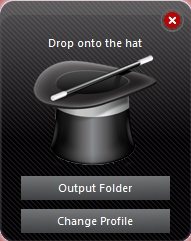
Photo Magician
Sponsored Links

Quick conversion mode also lets you change profile or output folder quickly.

Also check out Kigo Image converter, and Format Factory.

Photo Magician is a really easy to use image converter and image resizer. The design is well thought of, and has been especially geared towards ease of use.

Download Photo Magician here.

Home Page: Click Here
Works With: Windows
Free / Paid: Free

Link to This Page:


You Might Also Like:

  1. 5 Best Bulk Image Resizer For Batch Image Resize
  2. Free Image Converter Software For Windows
  3. Batch Image Resizer Batch Image Converter – ImRe
  4. Free Batch Photo Converter Batch Photo Resizer
  5. Image Tools: Bulk Image Converter, Resizer, Cropper, Watermarker

Be the first to know about Latest Free Software:

  • Join us on Facebook
  • Subscribe to our RSS Feed
  • Follow us on Twitter
  • Subscribe to Email Updates:

Posted in File Converters, Image & Photo | Tagged convert images, image converter, image resizer, resize images | Leave a response

Ishan Bansal

« Previous Next »

Featured Posts

  • Top 7 Free Launchers for Android
  • 5 Free Snippet Managers To Manage Code Snippets
  • 5 Free Online Tools To Test Website In Different Resolutions
  • 5 Free Microsoft Access Alternatives
  • 5 Free IP Notifier Apps
  • 5 Online Mapping Websites
  • 5 Free Alternatives To iGoogle
  • 7 Websites To Download Windows 8 Themes

Join More than 15,000 Followers!

Enter your Email Address
  • Submit Software
  • Software Testing Service
  • Write For Us
  • About Us
  • Privacy Policy
  • Disclosure
  • Contact Us

Link to Us:

Did we review your software here? Feel free to flaunt this badge on your website:

Free Software

Use this Code:

Copyright © 2013 I Love Free Software.

Powered by WordPress and Hybrid. New - H