• Home
  • Software Testing Service
  • About US
    • Privacy Policy
    • Disclosure
  • Write For Us
  • Submit Software
  • Contact Us
    • Subscribe
I Love Free Software
Best free software available all over the web. The free software categories include Windows Software, Social Networking Tools, and software installation videos.


  • Featured
  • Windows
  • Web Applications
  • App Store
  • Android
  • iPhone
  • iPad
  • Windows 8
  • Social Networking
  • Programming Tools

Password Safe – Free and Open Source Password Manager

By Tom on March 31, 2010 | Sponsored Links

Password Safe is a free and open source password manager. Password Safe is able to store your usernames and passwords in a secure “safe” protected by a master password, also providing an easy feature for copy and pasting your username and password into the various websites that you need them for.

When you first start the program, you must set up a “safe” in which you are able to store all of the passwords that you want to keep safe within the free password manager. You simply set up a master password (which you must remember) for the little database and then you are away.

[Also Read: 6 Best Free Password Managers]
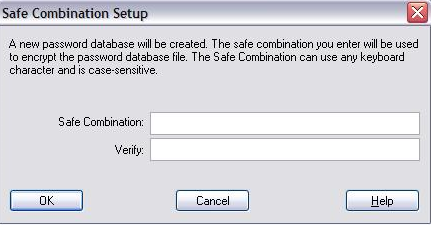
The initial master password entry screen for Password Safe.
Sponsored Links

From here, you can begin the very simple process of inputting your actual usernames and passwords into the free password manager. This is a very simple process and allows you to keep track of a lot of passwords, meaning you needn’t have to struggle to remember what you set up when you signed up to the particular website. It is the perfect antidote for those with a poor memory.

Keyboard shortcuts can also be used to copy and paste usernames and passwords from the free password manager into the input boxes on web pages. When copying a username, you can use the Ctrl + U shortcut and, with a password, you can use the Ctrl + C shortcut to get the data onto your clipboard so it can be pasted.

So to conclude, Password Safe is a clever bit of software that enables users to keep a record of all of the information they use to get into various websites. It does it securely and easily making it an excellent free password manager that I would happily recommend to absolutely anyone. If you want to instead store your passwords online, you can use Clipperz.

Home Page: Click Here
Works With: Windows
Free / Paid: Free

Link to This Page:


You Might Also Like:

  1. MobileWitch Pass Safe: Password Manager for PC and Mobile
  2. iPassMan – Free Password Manager
  3. Download MyPadLock Free Password Manager
  4. Download KeePass Free Password Manager: Secure your passwords
  5. Free Password Manager To Manage Login Credentials And Credit Card Info

Be the first to know about Latest Free Software:

  • Join us on Facebook
  • Subscribe to our RSS Feed
  • Follow us on Twitter
  • Subscribe to Email Updates:

Posted in Password Manager | Tagged best free password managers, free password manager, password, Password Manager, password managers | Leave a response

Tom

« Previous Next »

Featured Posts

  • Top 7 Free Launchers for Android
  • 5 Free Snippet Managers To Manage Code Snippets
  • 5 Free Online Tools To Test Website In Different Resolutions
  • 5 Free Microsoft Access Alternatives
  • 5 Free IP Notifier Apps
  • 5 Online Mapping Websites
  • 5 Free Alternatives To iGoogle
  • 7 Websites To Download Windows 8 Themes

Join More than 15,000 Followers!

Enter your Email Address
  • Submit Software
  • Software Testing Service
  • Write For Us
  • About Us
  • Privacy Policy
  • Disclosure
  • Contact Us

Link to Us:

Did we review your software here? Feel free to flaunt this badge on your website:

Free Software

Use this Code:

Copyright © 2013 I Love Free Software.

Powered by WordPress and Hybrid. New - H