• Home
  • Software Testing Service
  • About US
    • Privacy Policy
    • Disclosure
  • Write For Us
  • Submit Software
  • Contact Us
    • Subscribe
I Love Free Software
Best free software available all over the web. The free software categories include Windows Software, Social Networking Tools, and software installation videos.


  • Featured
  • Windows
  • Web Applications
  • App Store
  • Android
  • iPhone
  • iPad
  • Windows 8
  • Social Networking
  • Programming Tools

Reduce Size of Digital Photos: Photo Razor

By Ishan Bansal on March 31, 2011 | Sponsored Links

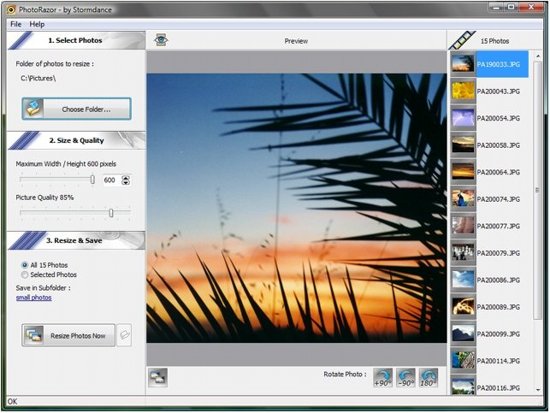
Photo Razor is a free software to reduce size of digital photos. It also works perfectly with photos taken from digital cameras. It can mass resize photos to reduce their size, and adjust image quality. While resizing photos, it leaves original photos as it is, and creates a separate reduced size copy of the photos.

We have reviewed many photo resizing software earlier, but Photo Razor is one of its own kind. The best part is that it can bulk resize all the photos in a folder in one go. In other words it is a specialized utility with the precise motive of reducing size of images. Normally, very high quality images are not utilized for online projects as they take more time to load and consume precious bandwidth.
PhotoRazor
Sponsored Links

How to Reduce Size of Digital Photos

Photo Razor is quite easy to use. Just download and install this software. After that, you can specify the folder that has all the digital photos that you want to resize. Then you can specify the folder in which you want to place resized photos. After that, you can specify maximum size of output photos, and adjust image quality. You can even preview the photos to see how will they look after resizing. Once you are satisfied with the settings, just click on “Resize Photos Now” button, and Photo Razor will resize digital photos.

Also check out other similar software, like, free picture resizer, and batch resize digital photos.

Features of Photo Razor:

  • You can resize all the photos in a folder, or even choose to resize individual photos.
  • Supported images formats are: JPEG, PNG, BMP, GIF.
  • Preview photos before resizing.
  • Change color photos to Black and White.
  • Rotate Photos
  • Adjust quality of output photos.
  • Completely free.

Download Photo Razor digital photo resizing software free.

Home Page: Click Here
Works With: Windows 7, Windows Vista, Windows XP, Windows 2000
Free / Paid: Free

Link to This Page:


You Might Also Like:

  1. Free Software To Reduce Image Size
  2. High Quality Photo Resizer: Batch Resize Digital Photos
  3. Download VSO Image Resizer: Reduce Size of Digital Photos Free
  4. Reduce Photo Size and Rotate Photos On Android
  5. Resize Photos for Digital Photo Frame: Oscar’s JPEG Thumb-Maker

Be the first to know about Latest Free Software:

  • Join us on Facebook
  • Subscribe to our RSS Feed
  • Follow us on Twitter
  • Subscribe to Email Updates:

Posted in Image & Photo | Tagged image resizer, photo resizer, resize digital photos, resize multiple images | Leave a response

Ishan Bansal

« Previous Next »

Featured Posts

  • Top 7 Free Launchers for Android
  • 5 Free Snippet Managers To Manage Code Snippets
  • 5 Free Online Tools To Test Website In Different Resolutions
  • 5 Free Microsoft Access Alternatives
  • 5 Free IP Notifier Apps
  • 5 Online Mapping Websites
  • 5 Free Alternatives To iGoogle
  • 7 Websites To Download Windows 8 Themes

Join More than 15,000 Followers!

Enter your Email Address
  • Submit Software
  • Software Testing Service
  • Write For Us
  • About Us
  • Privacy Policy
  • Disclosure
  • Contact Us

Link to Us:

Did we review your software here? Feel free to flaunt this badge on your website:

Free Software

Use this Code:

Copyright © 2013 I Love Free Software.

Powered by WordPress and Hybrid. New - H