CopyTrans TuneSwift is a free application that allows users to backup, restore, copy and transfer iTunes library without having to worry about following a lengthy process. If the thought of using some of the more complicated programs available today to perform the above actions is daunting, free TuneSwift is the program you should use.
The program is able to convert files between Mac and PC without any problem. This includes importing iTunes library from one computer to another. Free TuneSwift, as mentioned, also allows users to backup music files to an external disk. Basically users use the program to virtually extract their favorite tunes from iTunes library and place them either in a Windows system or Mac.
[Note: CopyTrans TuneSwift is free till 31 Mar 2011. It might become paid after that.]
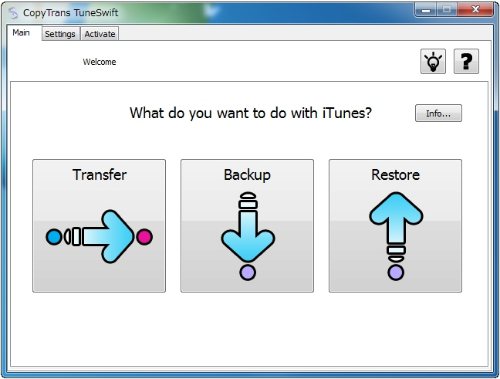
With files that have been lost, TuneSwift is also able to restore the file. It is the iTunes Library transfer option that is one of the free application’s most attractive points. Backup, import and export iTunes library is a simple process, taking moments and not hours of frustration. You can also read about alternatives to iTunes for Windows.
TuneSwift has an easily navigated interface. On the main screen there are three options displayed. These are ‘Transfer’, ‘Backup’ and ‘Restore’. Prior to making a choice, users are advised to read the iTunes library summary so as to understand clearly how the process works. The information window shows and explains all files. These include music videos, music files, audio books, PDF documents and so forth.
It is within these information windows that users are able to learn how to perform such tasks as, an iTunes backup, import iTunes libraries, export iTunes libraries and transfer iTunes from PC to Mac or vice versa. In the event a user wishes to transfer a file or files from a PC system to a Mac; he or she merely selects the OS and follows the instructions on the built-in wizard.
All screens are easily understood and navigated. Even if the user is not a computer whiz, he or she will be able to perform all the options hassle free. Clearly TuneSwift is the ideal free software for people that enjoy their media. It doesn’t matter which system you use, this free application is completely compatible.
