• Home
  • Software Testing Service
  • About US
    • Privacy Policy
    • Disclosure
  • Write For Us
  • Submit Software
  • Contact Us
    • Subscribe
I Love Free Software
Best free software available all over the web. The free software categories include Windows Software, Social Networking Tools, and software installation videos.


  • Featured
  • Windows
  • Web Applications
  • App Store
  • Android
  • iPhone
  • iPad
  • Windows 8
  • Social Networking
  • Programming Tools

How To Create Shortcut To Enable/Disable Android APN (Mobile Data)

By Lalit Aggarwal on March 31, 2012 | Sponsored Links

Here, are some steps to create shortcut to enable/disable Android APN or mobile data directly from Android screen.

Disabling or Enabling a mobile network or APN becomes a very long process on Android. To access mobile APN, you need to tap on wireless & network settings. Under wireless & network settings, tap on mobile networks option, then tap on access point names to enable/disable Android APN.

Below are some steps that cut short this long and pesky process and creates a shortcut on Android screen to enable/disable Android APN.

APN
Sponsored Links

Steps To create Shortcut To Enable/Disable Android APN:

Step 1: Login to Android Market.

Step 2: Search for “Widgetsoid2.X” app in Android Market.

Widgetsoid2

Step 3: Install Widegtsoid2.X app on your Android.

Step 4: Launch Widgetsoid2.X app on your Android to check whether the app is properly installed on your Android phone.
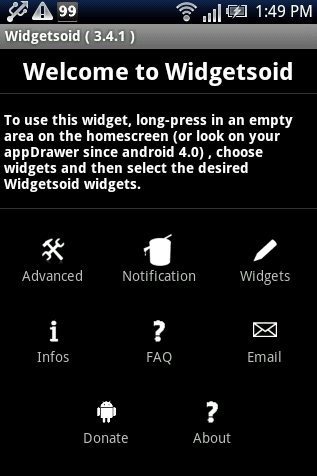
Widgetsoid2.X App

Step 5: Long press on the blank or empty space on your Android screen.

Step 6: Select widget or add widget option on your Android phone.

Step 7: Select Widgetsoid switcher widget from the list of widgets. (Select the size of the widget which fits your Android screen)
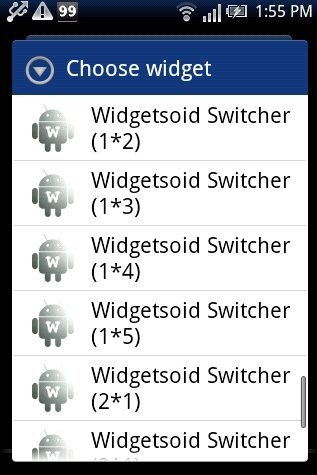
Widgetsoid2.X Widget List

Step 8: Customize the Widget by tapping on network option and then tapping on mobile data option from the widget.
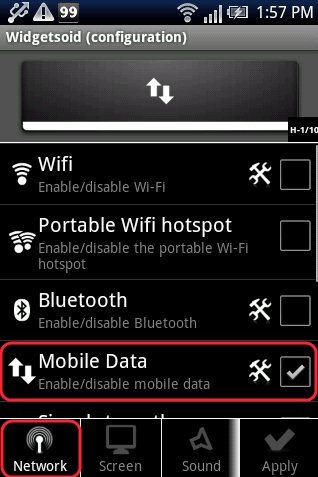
Widgetsoid2.X App Network option

Step 9: You will see a shortcut switch of APN for enabling or disabling it directly from your Android screen.
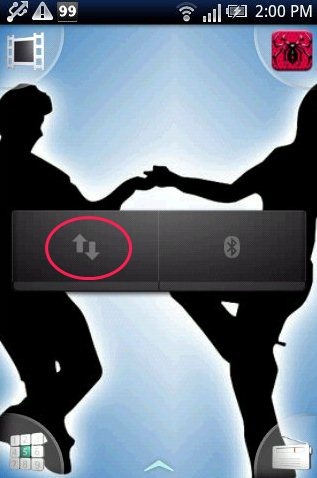
Widgetsoid2.X Widget

Also, check out how to create Wi-Fi shortcut on Android reviewed by us.

Now you have a shortcut on your Android home screen to access your data network. Enable or disable it right from your home screen. Go ahead and try it out.

Home Page: Click Here
Works With: Android 2.1 and up
Free / Paid: Free

Link to This Page:


You Might Also Like:

  1. How To Add GPS Shortcut Icon On Android Home Screen
  2. How To Create Wi-Fi Shortcut On Android
  3. How To Add A Website Shortcut On Android Home Screen
  4. How To Set Widget On Android
  5. How To Know CPU Usage, RAM Usage, Internal Memory Usage On Android

Be the first to know about Latest Free Software:

  • Join us on Facebook
  • Subscribe to our RSS Feed
  • Follow us on Twitter
  • Subscribe to Email Updates:

Posted in Android | Tagged android | Leave a response

Lalit Aggarwal

« Previous Next »

Featured Posts

  • Top 7 Free Launchers for Android
  • 5 Free Snippet Managers To Manage Code Snippets
  • 5 Free Online Tools To Test Website In Different Resolutions
  • 5 Free Microsoft Access Alternatives
  • 5 Free IP Notifier Apps
  • 5 Online Mapping Websites
  • 5 Free Alternatives To iGoogle
  • 7 Websites To Download Windows 8 Themes

Join More than 15,000 Followers!

Enter your Email Address
  • Submit Software
  • Software Testing Service
  • Write For Us
  • About Us
  • Privacy Policy
  • Disclosure
  • Contact Us

Link to Us:

Did we review your software here? Feel free to flaunt this badge on your website:

Free Software

Use this Code:

Copyright © 2013 I Love Free Software.

Powered by WordPress and Hybrid. New - H