• Home
  • Software Testing Service
  • About US
    • Privacy Policy
    • Disclosure
  • Write For Us
  • Submit Software
  • Contact Us
    • Subscribe
I Love Free Software
Best free software available all over the web. The free software categories include Windows Software, Social Networking Tools, and software installation videos.


  • Featured
  • Windows
  • Web Applications
  • App Store
  • Android
  • iPhone
  • iPad
  • Windows 8
  • Social Networking
  • Programming Tools

Keyboard Shortcuts / Hotkeys for Google Reader

By Ishan Bansal on April 30, 2012 | Sponsored Links

Here are some of the useful keyboard shortcuts / hotkeys for Google Reader. Google Reader is my favorite piece of software. Most of my online browsing time is spent on this. I find myself using it all the time, from web, from Google Reader desktop client, and from Google Reader for Android.

When I use Google Reader online, I hate scrolling a lot to move to next item in my feed list. If there is some long article in the feed that I don’t have to completely read, then I still have to completely scroll through that. I don’t like that, as it slows down my overall speed of going through feed items (I go through hundreds of feed items daily).

So today I decided to look around to see if there are some keyboard shortcuts for Google Reader, and I discovered a treasure trove. What a nice way to start the day!
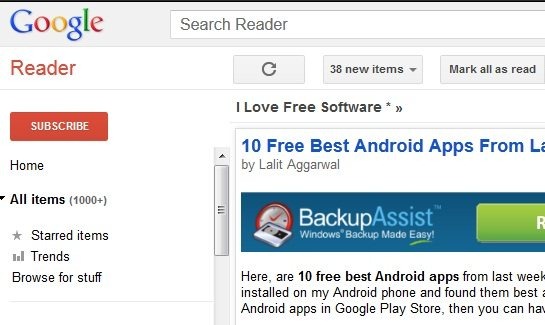
Google Reader
Sponsored Links

As it turns out, there are actually lot of hotkeys for Google Reader. Google has published a consolidated list here. As you can see, the list is too long to remember. So, I focused on the ones that are most useful for me, and decided to list them here.

Some of the Keyboard Shortcuts for Google Reader:

  • j: Select Next item in feed list
  • k: Select Previous item in feed list
  • enter: If you are looking at items in “list view”, clicking “enter” expands the selected item, or collapses that item (if already expanded).
  • s: Star the selected item. If already starred, it unstars it.
  • v: open the original website for the item in new window
  • r: refresh the feed list
  • f: Open Google Reader in full screen mode. This is perfect to get rid of navigation bar, as well the crap at the top. Press f again to get back to normal mode.

There are many more hotkeys for Google Reader, but I think the ones above are more than enough for me.

Note: “v” might be blocked by pop-up blocker sometimes. A good alternative to that is this Firefox plugin, that adds another shortcut “h”. Not only is it much closer to j and k on the keyboard, it also bypasses pop-ups, and neatly opens the selected feed item in a new tab in background.

Start using these Google Reader keyboard shortcuts, and supercharge your reading speed of Google Reader.

Got some other tips for Google Reader? Let me know in comments.

Home Page: Click Here
Free / Paid: Free

Link to This Page:


No related posts.

Be the first to know about Latest Free Software:

  • Join us on Facebook
  • Subscribe to our RSS Feed
  • Follow us on Twitter
  • Subscribe to Email Updates:

Posted in Web Applications | Tagged google reader | Leave a response

Ishan Bansal

« Previous Next »

Featured Posts

  • 5 Apps For Windows 8 To Record Sound
  • Top 7 Free Launchers for Android
  • 5 Free Snippet Managers To Manage Code Snippets
  • 5 Free Online Tools To Test Website In Different Resolutions
  • 5 Free Microsoft Access Alternatives
  • 5 Free IP Notifier Apps
  • 5 Online Mapping Websites
  • 5 Free Alternatives To iGoogle

Join More than 15,000 Followers!

Enter your Email Address
  • Submit Software
  • Software Testing Service
  • Write For Us
  • About Us
  • Privacy Policy
  • Disclosure
  • Contact Us

Link to Us:

Did we review your software here? Feel free to flaunt this badge on your website:

Free Software

Use this Code:

Copyright © 2013 I Love Free Software.

Powered by WordPress and Hybrid. New - H