Connection Keeper is a free network tweak tool to maintain the internet connection,especially while using dial-up network. This free network tweak application essentially simulates browsing activity , thereby preventing the connection from going to idle state. This program makes sure that the user is connected to the internet without any interruption.
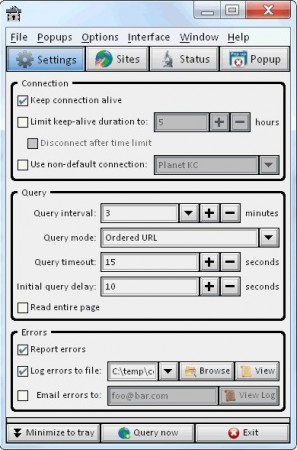
Internet connection, when connected using a dial-up network , gets disconnected while the user is idle. It requires constant activity on the network, either continuous browsing or a download. And when this does not happen, the ISP, more often than not, drops the connection and the user has to dial-up again to get connected back. This makes it inconvenient for the users. Connection Keeper has been designed to eliminate this problem and to make sure that the dial-up users surf the internet without any problem.
In fact the program even automatically dials-up to the network, in case of disconnection. Apart from this this free network tweak tool can also close the popup windows asking if the user wants to stay connected. This freeware has been designed to work on machines running various versions of Windows operating systems such as 95, 98, 2000, Vista, NT and 7. The size of the latest version installer being just 5MB, it can be downloaded and installed in no time.
You can also try Ashampoo Internet Accelerator, Connection Meter and Fing reviewed by us.
Some of the Interesting features of Connection Keeper are:
- Once configured, the program can automatically dial-up and connect to the internet in case of any disconnection.
- Can run minimized in the system tray when the systems is not connected to the internet and it consumes almost no bandwidth.
- The interval of simulation activity is can be set by the user or it can be made to check at regular intervals.
- It can be used to report buggy URL connections and it can be configured to download a proper or a bogus URL.
- Comes with a simple interface and no advertisments or any such kind of distraction.
- Command line operation to perform the above said functions is also available.
With all these features, Connection Keeper is a free software for all those Dial-up connection users to keep their Internet connections alive. Try Connection Keeper Free.
