Executor is a free program launcher which lets you launch Windows applications and programs from one point. No need of combing all your folders from top to bottom. Just search the program/application/link on Executor and you are instantly transported to your preferred location. Desktop Launchers/Program Launchers, (call whatever you please) make life easier by assimilating all the programs at one place so that you don’t have to hunt for that file or that program in your start menu. And with the advent of new technology, the start menu keeps on growing with all those programs. You can launch programs in any way you desire.
Executor hits the home run with its intelligent search, there are not many program launchers that can perform auto detection. But this free program launcher is loaded with all the super stuff. It not only performs all that has been mentioned above, but you can launch programs of all kinds be it a webpage or your media player. Minor tweaks or major manipulation, everything has been loaded in this free program launcher. You can launch program with greatest ease.
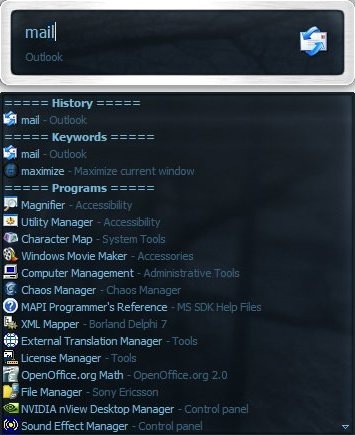
Key Features of Program Launcher “ Executor”
- One stop Program Launcher, No need to scan folders to launch a specific application. Launch program by providing keyword to Executor
- Keyword Detection of the Program. The keywords are automatically completed too.
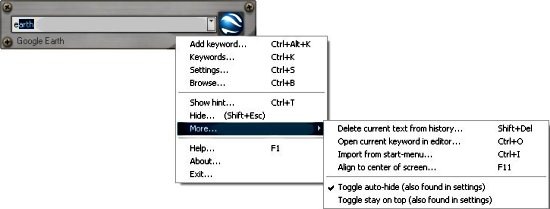
- URL Detection, You can enter URLs directly in the Program Launcher. You can save those keywords by accessing the context menu
- Assign Hotkeys, change the hotkeys and shortcuts of the free program launcher
- Super Customizable, Executor’s settings can be manipulated to any extent.
- Free, the free program launcher is free.
- Windows Utility Software, works on all windows systems from Windows 95 to Windows 8, but there is limited windows functionality under Windows 95/98.
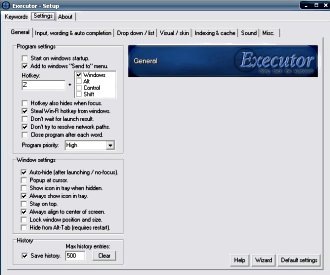
The only drawback is that the homepage is too cluttered up, but the free program launcher is a 5 star software, which enhances your PC utility experience.
Another free program launcher you could try out is 8start Launcher.
How to download Executor :
- Go to the homepage.
- Click on the Download Tab.
- Download with one of the options given.
- After downloading, launch Executor.
- Click on the given option and your program will be launched.
- You can tweak the settings by right clicking the mouse button.
Executor is a free program launcher which wipes your miseries away. I recommend it to users who want their PC to be user-friendly. Try it now !
