• Home
  • Software Testing Service
  • About US
    • Privacy Policy
    • Disclosure
  • Write For Us
  • Submit Software
  • Contact Us
    • Subscribe
I Love Free Software
Best free software available all over the web. The free software categories include Windows Software, Social Networking Tools, and software installation videos.


  • Featured
  • Windows
  • Web Applications
  • App Store
  • Android
  • iPhone
  • iPad
  • Windows 8
  • Social Networking
  • Programming Tools

Merge Text Files into One For Free: TXTCollector

By Ishan Bansal on September 29, 2010 | Sponsored Links

TXTCollector is a free software to merge text files into one text file. Download this simple software and combine multiple text files for Free.

You just need to provide the name of directory in which your text files are located, and TXTCollector will combine text files into one single text file. You can also merge html, bat, csv, xml, etc. files into one text file.
merge text files
Sponsored Links

How To Merge Text Files Into One:

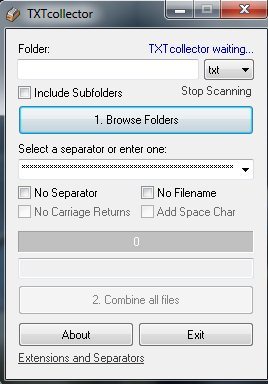
TXTcollector is very easy to use. Just keep all the files in one folder to combine them to one file. The formats other than text file, supported by this software are: bat, cfg, csv, dat, htm, ini, inf, log, reg, tag, and xml files. When you select one of the formats, then this TXTcollector combines all of them to one text file.

Let’s see how to use this software.

  • After you download and install this small software, click on the shortcut available on your desktop.
  • Then you can see the software interface as shown in above screenshot.
  • TXTCollector can also recursively scan sub-directories to extract files from your sub-directories, and merge them too. To do so, tick mark the option Include Subfolders.
  • You can select any format to combine them to text file. Just click on the txt option a dropdown menu will appear. Select one of them.
  • Click on the Browse Folders button to select a directory.
  • Select the directory where all the files are residing.
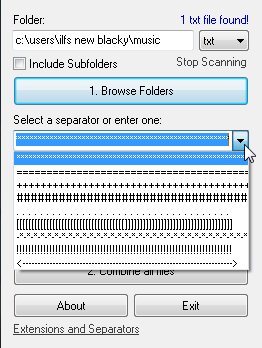
  • Click on Select a separator or enter one to select the kind of separator to separate your texts. This helps in differentiating the texts combined.
merge files seperator

  • If you select No separator, then there will be no separator in your combined text file.
  • If you select No file name then the combined text file will have no name.
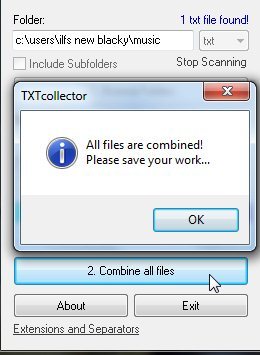
  • Now click on Combine All Files to combine the files you have selected.
  • After combining, a new window opens to request where to save the text file.
  • Then click Exit and go to the folder where you saved the file to view it.
merge files complete

TXTCollector is completely free, and easy to use. TXTCollector comes from the makers of Hide Desktop Icons.

To merge text files to one text file use TXTCollector. Click here to Download TXTCollector.

Home Page: Click Here
Works With: Windows 7, Windows Vista, Windows XP, Windows NT, Windows 2000
Free / Paid: Free

Link to This Page:


You Might Also Like:

  1. How to Merge Combine Multiple Excel Files
  2. Adolix Split Merge PDF: Split and Merge PDF Files Free
  3. Combine PDF Files, Split PDF: Hexonic PDF Split and Merge
  4. Replace Text in Multiple Files: Neo Replace
  5. Merge PDF Files Into A Single PDF File With MergePDF

Be the first to know about Latest Free Software:

  • Join us on Facebook
  • Subscribe to our RSS Feed
  • Follow us on Twitter
  • Subscribe to Email Updates:

Posted in File Utilities | Tagged merge files | Leave a response

Ishan Bansal

« Previous Next »

Featured Posts

  • Top 7 Free Launchers for Android
  • 5 Free Snippet Managers To Manage Code Snippets
  • 5 Free Online Tools To Test Website In Different Resolutions
  • 5 Free Microsoft Access Alternatives
  • 5 Free IP Notifier Apps
  • 5 Online Mapping Websites
  • 5 Free Alternatives To iGoogle
  • 7 Websites To Download Windows 8 Themes

Join More than 15,000 Followers!

Enter your Email Address
  • Submit Software
  • Software Testing Service
  • Write For Us
  • About Us
  • Privacy Policy
  • Disclosure
  • Contact Us

Link to Us:

Did we review your software here? Feel free to flaunt this badge on your website:

Free Software

Use this Code:

Copyright © 2013 I Love Free Software.

Powered by WordPress and Hybrid. New - H