Nowadays all of us have to remember lots of passwords. I have multiple passwords for websites, computer login, banks etc. It has become a big problem to remember all those passwords. Password Managers come really handy in that case.
A password manager is a software in which you can store all your passwords. It basically stores all your data in some file or database, and keeps that encrypted. All the passwords can be accessed be one single master password. This ensures that you just need to remember one password, and using that you can access all your passwords.
KeePass is one such password manager. It is a totally free password manager. KeePass stores all passwords in a database. What set asides KeePass password manager from all other password managers is that it is very secure. KeePass uses secure encrytion algorithms to encrypt your password. KeePass uses Advanced Encryption Standard and Twofish algorithms. These encryption techniques are used by even banks to secure their data.
Apart from this, here are other security features in KeePass password manager:
It encrypts complete database, and not just passwords, so even your username and other info is encrypted.
Uses SHA-256 as password hash to hash out master password.
Option to open your database using master password, or a password file, or both.
Passwords are encrypted even while KeePass is running. So, even in memory cache your passwords are not exposed.
Here are some video tutorials about KeePass.
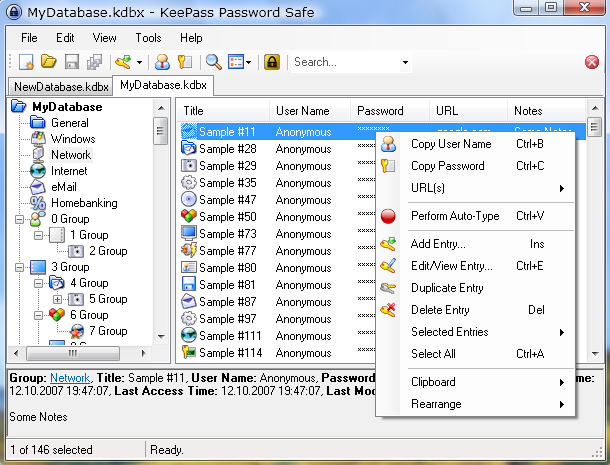
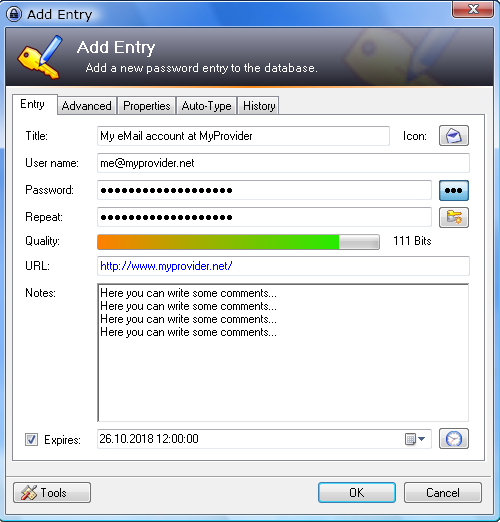
In KeePass password manager, you can store URL of website, username, password and some additional comments. Then you can open website directly from KeePass password manager. KeePass can directly type username and password also in that. So, you don’t have to remember any password.
As you would have noticed from above, KeePass is a highly safe and secure free password manager.
Here are other features of this Free Password Manager
KeePass is portable – it can be carried on a USB drive / flash drive / CD.
There is no need to install KeePass on system, and can run directly.
Passwords can be exported to various formats, like, HTML, TXT etc.
KeePass can import passwords from many other popular password managers.
KeePass can generate strong random passwords for you.
If you are tired of remembering lot of passwords, give this free password manager a try. Download using links at the end.
Runs on: Windows, Mac OS X, Linux, BSD etc.
Nowadays all of us have to remember lots of passwords. I have multiple passwords for websites, computer login, banks etc. It has become a big problem to remember all those passwords. Password Managers come really handy in that case.
A password manager is a software in which you can store all your passwords. It basically stores all your data in some file or database, and keeps that encrypted. All the passwords can be accessed be one single master password. This ensures that you just need to remember one password, and using that you can access all your passwords.
KeePass is one such password manager. It is a totally free password manager. KeePass stores all passwords in a database. What set asides KeePass password manager from all other password managers is that it is very secure. KeePass uses secure encrytion algorithms to encrypt your password. KeePass uses Advanced Encryption Standard and Twofish algorithms. These encryption techniques are used by even banks to secure their data.
Apart from this, here are other security features in KeePass password manager:
It encrypts complete database, and not just passwords, so even your username and other info is encrypted.
Uses SHA-256 as password hash to hash out master password.
Passwords are encrypted even while KeePass is running. So, even in memory cache your passwords are not exposed.
Option to open your database using master password, or a password file, or both.
As you would have noticed from above, KeePass is a highly safe and secure free password manager.
In KeePass password manager, you can store URL of website, username, password and some additional comments. Then you can open website directly from KeePass password manager. KeePass can directly type username and password also in that. So, you don’t have to remember any password.
Here are other features of this Free Password Manager:
KeePass is portable – it can be carried on a USB drive / flash drive / CD.
There is no need to install KeePass on system, and can run directly.
Passwords can be exported to various formats, like, HTML, TXT etc.
KeePass can import passwords from many other popular password managers.
KeePass can generate strong random passwords for you.
If you are tired of remembering lot of passwords, give this free password manager a try. Download using links at the end.