Now you can perform Google search by simply writing on Google Homepage on smartphones and tablets. Google has launched this new handwriting feature that makes it even easier to enter your search term in Google.com on your smartphone.
With Google Handwrite, you can write anything using your fingers on Google Search page without the keyboard and Google will search for the content you have written. The new Handwrite feature makes it easier for Google users to type and search for the content in a faster way. Google Handwrite works with only touch screen smart devices. Open Google search page and start writing the search content using your fingers anywhere on Google search page.
Google Handwrite is in beta version and can be activated from the settings menu.
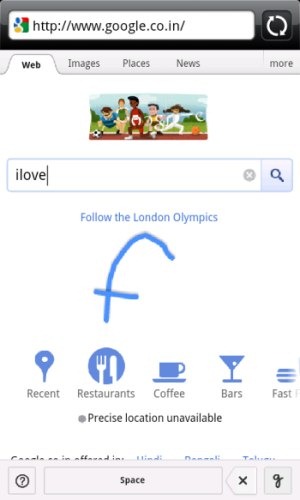
Typing search contents from smart device keyboard becomes time-consuming. But Google Handwrite makes it easier for you to type search contents using your fingers. Now typing speed depends on how fast your fingers work. You don’t need to learn basic format of typing on smart devices keyboard while browsing on Google.
How To Enable Google Handwrite On Android Phone / iPhone / Other smart devices:
I tested the Google Handwrite on my Samsung Android phone, and it worked like a charm. The same steps should work for other smart devices as well:
Step 1: Open your Android browser and then open Google on your browser.
Step 2: Scroll down on the Google home page. You will see a link called “Settings”. Click on it.
Step 3: Scroll down and you will find “Handwrite” tab. Enable Handwrite option.
Step 4: Refresh the page and you are now ready to start writing using your hands.
How To Use Google Handwrite:
- Tap on the Google Handwrite button
 below at the right corner of Google main home page.
 - Start writing using your fingers anywhere on Google home page.
- The alphabets which you type will be converted into text, and will be written in search box of Google. Side-by-side, Google will also start giving you auto-complete suggestions, so that you don’t have to write the complete search term.
- If you want to delete any alphabet or any word written, then tap on the back button at the bottom of the webpage. For space, tap on the space bar button at the bottom of the webpage.

- Last, tap on Search button
 situated right to Google search bar.



Note: To disable Google Handwrite, again tap on Handwrite button at the bottom of the webpage and you are done with.
You can check out a small video on the new Google Handwrite in Google:
Click on the link to know more about Google Handwrite.
