• Home
  • Software Testing Service
  • About US
    • Privacy Policy
    • Disclosure
  • Write For Us
  • Submit Software
  • Contact Us
    • Subscribe
I Love Free Software
Best free software available all over the web. The free software categories include Windows Software, Social Networking Tools, and software installation videos.


  • Featured
  • Windows
  • Web Applications
  • App Store
  • Android
  • iPhone
  • iPad
  • Windows 8
  • Social Networking
  • Programming Tools

How To Free Up Android Disk Space

By Lalit Aggarwal on March 27, 2012 | Sponsored Links

Here, are some steps to free up Android disk space. Your Android phone starts working and responding slow when you have many files stored on your Android phone’s disk.

From the bundle of multiple files and folders stored on your Android disk, there are many files that are useless. Also, whenever you install any app on your Android phone, almost all the apps create its own folder on your Android disk. These files and folders create a mess on your Android disk which lowers the speed of working of your Android phone.

Also, restarting or elapsed time of your phone also increases with the increasing useless files and folders. The reason behind increasing elapsed time is the time taken to read increasing files and folders on your Android disk. So below are the steps to free up Android disk space.

Steps To Free Up Android Disk Space:

Step 1: Unlock your Android phone.

Step 2: Open the file manager or ES File Explorer app on your Android phone.

Step 3: Select the files and folders you want to delete.

Android Multi Select
Sponsored Links

Step 4: Long press on any one folders selected to access delete option from your file manager or ES File Explorer.
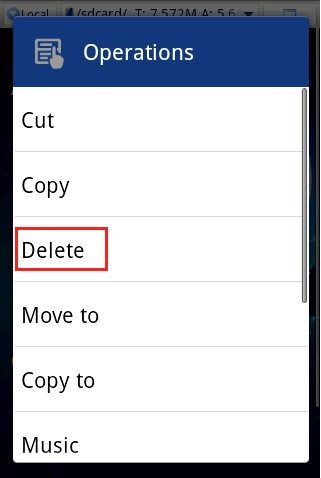
Android Delete option

Step 5: Now delete the temp files from “Android” folder on your Android disk. Also, delete the unwanted files and folders which includes app created folders on your Android phone.

Step 6: Now your Android disk space is free from unwanted files and folders. You Android phone will automatically start running faster than before.

Also, check out how to automatically set Android phone on vibration mode reviewed by us.

I recommend that you install ES File Explorer to manage your files and folders on Android. The app makes it easy for you to perform multiple tasks in one go on Android. Go ahead and try it out. It will sure make your Android faster than before.

Link to This Page:


You Might Also Like:

  1. Download Disk Space Fan – Disk Space Analysis Software
  2. How To View Files In Windows File Explorer Look On Android
  3. Free Folder Space Calculator to Analyze Disk Space Used: DirSpace
  4. 5 Best Free Disk Space Analyzers
  5. Folder Size: Free Disk Space Analysis Tool

Be the first to know about Latest Free Software:

  • Join us on Facebook
  • Subscribe to our RSS Feed
  • Follow us on Twitter
  • Subscribe to Email Updates:

Posted in Android | Tagged android | Leave a response

Lalit Aggarwal

« Previous Next »

Featured Posts

  • Top 7 Free Launchers for Android
  • 5 Free Snippet Managers To Manage Code Snippets
  • 5 Free Online Tools To Test Website In Different Resolutions
  • 5 Free Microsoft Access Alternatives
  • 5 Free IP Notifier Apps
  • 5 Online Mapping Websites
  • 5 Free Alternatives To iGoogle
  • 7 Websites To Download Windows 8 Themes

Join More than 15,000 Followers!

Enter your Email Address
  • Submit Software
  • Software Testing Service
  • Write For Us
  • About Us
  • Privacy Policy
  • Disclosure
  • Contact Us

Link to Us:

Did we review your software here? Feel free to flaunt this badge on your website:

Free Software

Use this Code:

Copyright © 2013 I Love Free Software.

Powered by WordPress and Hybrid. New - H