• Home
  • Software Testing Service
  • About US
    • Privacy Policy
    • Disclosure
  • Write For Us
  • Submit Software
  • Contact Us
    • Subscribe
I Love Free Software
Best free software available all over the web. The free software categories include Windows Software, Social Networking Tools, and software installation videos.


  • Featured
  • Windows
  • Web Applications
  • App Store
  • Android
  • iPhone
  • iPad
  • Windows 8
  • Social Networking
  • Programming Tools

Kigo Image Converter: Free Bulk Image Converter and Resizer

By Garima on July 26, 2010 | Sponsored Links

Kigo Image Converter is a free software that lets you convert any image to the format it supports.
There are many images that do not open in other programs because of the file format they support. But here is a free image converter that makes your work easy by converting any image format into the one you require. Some other image converters include Format Factory, and Free Online Image Converter.
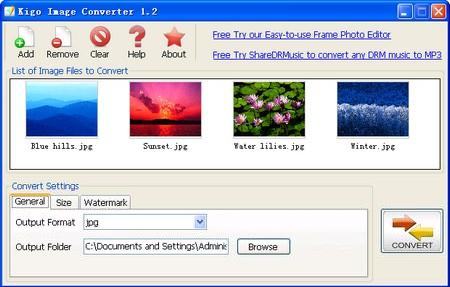
You can convert as many images you want to in one go. Apart from just converting images into other formats, it also scales the size of images and can add watermark to images.
The images you select will be shown as thumbnails and you just have to click on the ‘convert’ button to convert the picture.
Sponsored Links

Here are some features of Kigo Image Converter:

  • The file formats that it supports are -  Windows Bitmap (.BMP), JPEG (.JPG), JPEG 2000 (.J2K), JPC (.jPC), PNG (.PNG), TIFF (.TIF,.TIFF), TGA (.TGA), PCX (.PCX), PNM (.PNM)
  • It lets you add watermarks to images
  • It lets you scale the size of any image
  • You can set the position, text and font of the image where you want to watermark
  • It can also be used as a thumbnail maker
  • It allows batch conversion

Using Kigo Image Converter, you can reduce the storage space occupied by image files. One way could be by scaling down the width and height of images and the other way could be of compressing the file.

This program works efficiently and and converts any image you wish to into other formats and is completely free of cost.

If you want a full featured image management suite, you can try FastStone Image Viewer, and IrfanView.

Home Page: Click Here
Works With: Windows
Free / Paid: Free

Link to This Page:


You Might Also Like:

  1. Bulk Image Resize, Convert, Rename: Image Tuner
  2. Photo Magician: Free Image Converter and Image Resizer
  3. Image Tools: Bulk Image Converter, Resizer, Cropper, Watermarker
  4. Batch Image Resizer Batch Image Converter – ImRe
  5. 5 Best Bulk Image Resizer For Batch Image Resize

Be the first to know about Latest Free Software:

  • Join us on Facebook
  • Subscribe to our RSS Feed
  • Follow us on Twitter
  • Subscribe to Email Updates:

Posted in Image & Photo, Image & Photo Editors | Tagged add watermark to images, batch conversion, image converter, watermark | Leave a response

Garima

« Previous Next »

Featured Posts

  • 5 Free Snippet Managers To Manage Code Snippets
  • 5 Free Online Tools To Test Website In Different Resolutions
  • 5 Free Microsoft Access Alternatives
  • 5 Free IP Notifier Apps
  • 5 Online Mapping Websites
  • 5 Free Alternatives To iGoogle
  • 7 Websites To Download Windows 8 Themes
  • 5 Best Free Calculator Apps For Windows 8

Join More than 15,000 Followers!

Enter your Email Address
  • Submit Software
  • Software Testing Service
  • Write For Us
  • About Us
  • Privacy Policy
  • Disclosure
  • Contact Us

Link to Us:

Did we review your software here? Feel free to flaunt this badge on your website:

Free Software

Use this Code:

Copyright © 2013 I Love Free Software.

Powered by WordPress and Hybrid. New - H