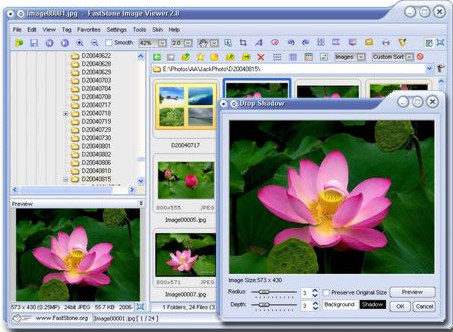
FastStone Image Viewer actually has a wrong name. The name makes you feel like it is a simple image viewer. But FastStone Image Viewer is much much more. It is more like a completely free image management suite.
Image Viewing Capabilities
To start with, FastStone Image Viewer comes with great image vieweing capabilities. It comes with Windows Explorer like interface to view images. While you are viewing images, FastStone Image Viewer provides very easy to use controls to zoom images, go to full screen, rotate, and resize.
FastStone Image Viewer supports following image formats:
As you see above, tons of image formats are supported to view images.
Image Editing Capabilities
Now, let’s talk about FastStone Image Viewer’s image editing capabilities. FastStone Image Viewer provides very easy to use tool to make everyday editing to your photos. The editing controls are integrated within image viewer itself, are present in hidden menu bars. Just taking your mouse over to the side of the screen brings up a fly-out menu bar with all the controls.
Here are some of the editing capabilities provided by FastStone Image Viewer:
Superior Red-Eye effect removal/reduction with completely natural looking end result
Image modification tools: Resize/resample, rotate/flip, crop, sharpen/blur, brightness/contrast, etc.
Eleven resampling algorithms to choose from when resizing images
Image color effects: gray scale, sepia, negative, Red/Green/Blue adjustment
Image special effects: watermark, annotation, drop shadow, framing, bump map, lens, morph, waves.
Acquire images from a scanner.
Apart from this, FastStone Image Viewer also has versatile screen capture capabilities. Of course, for full fledged image capture, you can use GadWin PrintScreen free.
When you are editing images, FastStone Image Viewer provides multi-level Undo. This is one feature that is absolute must in image editors, and something that I really love in IrfanView.
When you are editing images, FastStone Image Viewer also lets you draw small shapes on the image if you want to highlight some sections. You can draw texts, lines, highlights, rectangles, ovals and callout objects on images.
[Related: Video Tutorial – How to Download, Install, and Use FastStone Image Viewer]
Image Converter Capabilities:
FastStone Image Viewer has some good image conversion capabilities. You can convert the images to any of the following formats:
JPEG, BMP, GIF, PNG, TIFF, PCX, TGA, JPEG2000.
It comes with a powerful Save As interface to compare image quality and control generated file size. FastStone Image Viewer also lets you convert the images to email friendly format to send them to your friends. It has Configurable batch processing to convert/rename large or small collections of images.
Image Management Capabilities:
Tagging capability, with drag-and-drop and Copy To/Move To Folder support
Print images with full page-layout control
Create fully configurable Contact Sheets – just like the pros (and save $$ on ink)
Create memorable artistic image montages from your family photos for personalized desktop wallpapers (Wallpaper Anywhere)
I hope by now you would have agreed with my statement that FastStone Image Viewer has a wrong name. This is really a versatile suite to work with images. It is extremely easy to use, and totally free. Love it!
Download links, and Video Tutorials at the end.
FastStone Image Viewer actually has a wrong name. The name makes you feel like it is a simple image viewer. But FastStone Image Viewer is much much more. It is more like a completely free image management suite.
Image Viewing Capabilities
To start with, FastStone Image Viewer comes with great image vieweing capabilities. It comes with Windows Explorer like interface to view images. While you are viewing images, FastStone Image Viewer provides very easy to use controls to zoom images, go to full screen, rotate, and resize.
FastStone Image Viewer supports following image formats:
As you see above, tons of image formats are supported to view images.
Image Editing Capabilities
Now, let’s talk about FastStone Image Viewer’s image editing capabilities. FastStone Image Viewer provides very easy to use tool to make everyday editing to your photos. The editing controls are integrated within image viewer itself, are present in hidden menu bars. Just taking your mouse over to the side of the screen brings up a fly-out menu bar with all the controls.
Here are some of the editing capabilities provided by FastStone Image Viewer:
Superior Red-Eye effect removal/reduction with completely natural looking end result
Image modification tools: Resize/resample, rotate/flip, crop, sharpen/blur, brightness/contrast, etc.
Eleven resampling algorithms to choose from when resizing images
Image color effects: gray scale, sepia, negative, Red/Green/Blue adjustment
Image special effects: watermark, annotation, drop shadow, framing, bump map, lens, morph, waves.
Acquire images from a scanner.
Apart from this, FastStone Image Viewer also has versatile screen capture capabilities. Of course, for full fledged image capture, you can use GadWin PrintScreen free.
When you are editing images, FastStone Image Viewer provides multi-level Undo. This is one feature that is absolute must in image editors, and something that I really love in IrfanView.
When you are editing images, FastStone Image Viewer also lets you draw small shapes on the image if you want to highlight some sections. You can draw texts, lines, highlights, rectangles, ovals and callout objects on images.
Image Converter Capabilities:
FastStone Image Viewer has some good image conversion capabilities. You can convert the images to any of the following formats:
JPEG, BMP, GIF, PNG, TIFF, PCX, TGA, JPEG2000.
It comes with a powerful Save As interface to compare image quality and control generated file size. FastStone Image Viewer also lets you convert the images to email friendly format to send them to your friends. It has Configurable batch processing to convert/rename large or small collections of images.
Image Management Capabilities:
Tagging capability, with drag-and-drop and Copy To/Move To Folder support
Print images with full page-layout control
Create fully configurable Contact Sheets – just like the pros (and save $$$ on ink)
Create memorable artistic image montages from your family photos for personalized desktop wallpapers (Wallpaper Anywhere)
I hope by now you would have agreed with my statement that FastStone Image Viewer has a wrong name. This is really a versatile suite to work with images. It is extremely easy to use, and totally free. Love it!