Free Window Registry Repair is a free registry cleaner to repair Windows registry and can improve system performance. Often we observe slow Windows processing and one of the reasons for this is errors in the registry. Window Registry Repair is a powerful free system utility that can repair registry errors.
The free registry cleaner is easy to use and a simple free system utility to operate. You can repair registry errors in just a few mouse clicks so you attain maximum optimization and enhance Windows using Windows Registry Repair.
For another free system utility to repair registry errors, Tweaknow RegClean is useful.
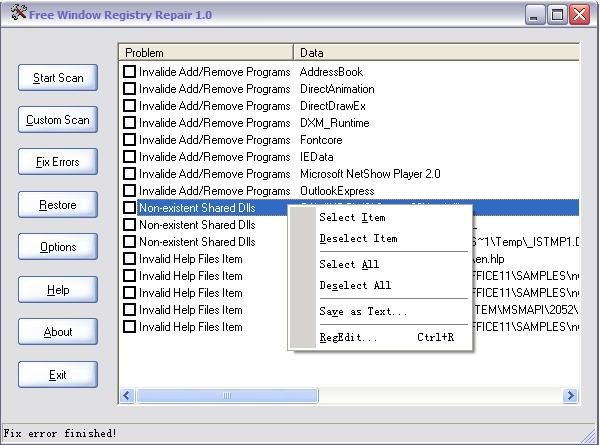
Windows Registry Repair has a very simple, clear and instructive step by step interface. It doesn’t stray from its own objective unlike other tools which are loaded with unwarranted services. Your system might experience threats of slow processing and even crashing down if immediate steps are not taken to repair registry errors.
This free registry cleaner invalidates the entries that cause threats for your system to repair the Windows registry. This way you can increase your system speed and enhance Windows.
Windows Registry Repair scans Windows amongst the registry entries, for erroneous entries. You can also set configuration to scan the whole of Windows or just required areas. Scanning is pretty fast in Window Registry Repair, and you get sorted data and keys as per their problem types to repair registry errors.
Now you can fix the problems of individual entries or whole for batch in just few clicks and by setting different cleaning preferences in Windows Registry Repair. With a single click you can also check out registry of specific items and set your preferences accordingly to repair the Windows registry.
One unique feature about Window Registry Repair is that it creates back up when you repair registry errors. Once you repair the Windows registry, the free system utility creates back up of all the registry. So that when in future, you require registry of specific item then you can access it from its backup file. Only you click the restore button, you restore any fixed registry. Hence, it is an overall simple and speedy free registry cleaner to enhance Windows.
For an alternative to Windows Registry Repair, a free registry cleaner like CCleaner, Comodo System Cleaner or Wise Registry Cleaner is a good choice.
