Windows Live Family Safety: Manage and Monitor Online Activities of your Children
Windows Live Family Safety is a free software to manage and monitor online activities of your children. You can limit searches, monitor and block or allow websites, and decide who your kids can communicate with in Windows Live Spaces, Messenger, or Hotmail.
This free software has some very useful features:
Customized Settings for Each Child
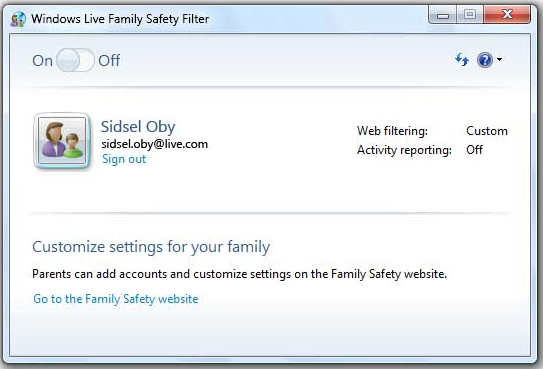
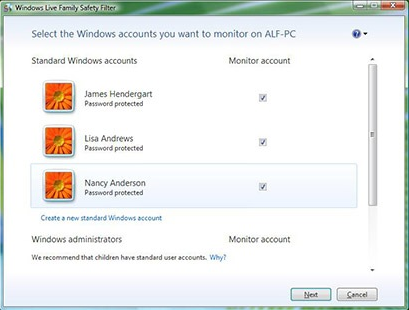
Windows Live Family Safety lets you custom define settings for each of your child. You start with creating a separate Windows account for each of them. Then, you can do custom settings for each Windows Account. When a child logs on to the computer using their Windows account, their custom settings kick in. This also ensures that you can get custom activity report for each of your child.
Define Web Filters
You can define filters to manage the content that your children can access on web. You can define custom filters for each of your child, by defining the filters for their individual Windows accounts. If you children want to access something that you have blocked out for them, then they can create an online request for the same. When you go to your Windows Live Family Safety account online, you will be able to see that request, and can choose to access or deny that.
Activity Reports:
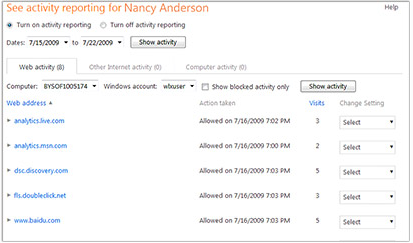
Windows Live Family Safety gives you detaild activity reports for each of your children. The reports show the websites that your child visited, or tried to visit, the programs that your child used, and how much time did they spent on the computer.
Manage who your Children can Talk to:
Windows Live Family Safety lets you customize who your children can contact in Windows Live Spaces, Messenger, and Hotmail. I wish this control could have been extended to other programs as well, such as Myspace, Facebook, Yahoo Messenger etc.
Manage Settings Online:
When you install Windows Live Family Safety, you can access the settings from your Windows Live account. You can go to your online account anytime, and manage your settings from there. So, once you have installed Windows Live Family Safety on the computer that your children access, you don’t even need to login to that again to modify settings. You can do the same directly from your password protected online account that you can access from anywhere.
Windows Live Family Safety is really good to protect your children from suspicious websites, and people online. Download links, and video tutorial at the end.
Windows Live Family Safety is a free software to manage and monitor online activities of your children. You can limit searches, monitor and block or allow websites, and decide who your kids can communicate with in Windows Live Spaces, Messenger, or Hotmail.
This free software has some very useful features:
Customized Settings for Each Child
Windows Live Family Safety lets you custom define settings for each of your child. You start with creating a separate Windows account for each of them. Then, you can do custom settings for each Windows Account. When a child logs on to the computer using their Windows account, their custom settings kick in. This also ensures that you can get custom activity report for each of your child.
Define Web Filters
You can define filters to manage the content that your children can access on web. You can define custom filters for each of your child, by defining the filters for their individual Windows accounts. If you children want to access something that you have blocked out for them, then they can create an online request for the same. When you go to your Windows Live Family Safety account online, you will be able to see that request, and can choose to access or deny that.
Activity Reports:
Windows Live Family Safety gives you detailed activity reports for each of your children. The reports show the websites that your child visited, or tried to visit, the programs that your child used, and how much time did they spent on the computer.
Manage who your Children can Talk to:
Windows Live Family Safety lets you customize who your children can contact in Windows Live Spaces, Messenger, and Hotmail. I wish this control could have been extended to other programs as well, such as Myspace, Facebook, Yahoo Messenger etc.
Manage Settings Online:
When you install Windows Live Family Safety, you can access the settings from your Windows Live account. You can go to your online account anytime, and manage your settings from there. So, once you have installed Windows Live Family Safety on the computer that your children access, you don’t even need to login to that again to modify settings. You can do the same directly from your password protected online account that you can access from anywhere.
Windows Live Family Safety is really good to protect your children from suspicious websites, and people online. Download links, and video tutorial at the end.