ZoneScreen is a free, innovative utility which helps the user to extend desktop workspace to network connected computers and even portable devices like the PDAs and Pocket PCs. In other words, Zonescreen is capable of mirroring the local desktop to another computer or a Personal Digital Device in the network. That is, With Zonescreen, the user is adding another screen to the system.
All that the user needs to do is, connect the systems via a network or connect the devices using a crossover connection cable. In case a pocket PC is used, the connection can be made with the help of ActiveSync ( Using special Cradle cables, Infra red Port etc.,). In a way using this software is like distributing the display on two different devices, which act as client and server systems, when compared with the general architecture of client-server systems.
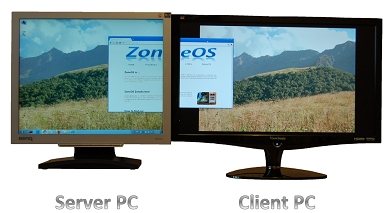
This can be done on various versions of the Windows Operating Systems like 2000, 2003 and XP. And Limited support is also available for versions like Windows Server 2008, Windows Vista and 7. The installer is available for free on zoneos.com and can be downloaded either as ZIP or as an MSI files, both of which are small in size and simple to install.
Also check out how to control multiple computers with one keyboard, and multi monitor mouse.
How to Use ZoneScreen:
ZoneScreen basically is made of 2 parts. Kernel mode Zonescreen and the user-mode Zonescreen. Kernel mode zone screen visual driver is visible to windows as a usual video-card with a monitor attached to it. And the user-mode Zonescreen is responsible for capturing the screen and sending it across the network to the other devices connected.
Machine with an extended display is called server and the machine which contributes the display alone is the client. Server machine has Virtual Display driver installed and ZoneScreen runs on it in the server mode. Client machine has ZoneScreen running in the client mode. The entire application is easy to configure and run, with the support provided.
With its unique design and features, Zonescreen is one of a kind utility to share the display among two different devices.
Download ZoneScreen free.
