Loudtalks Lite is a free push to talk voice chat software which allows you to have real time voice communication in private or with a group of people for free. This is a free software which supports push to talk messaging. Loudtalks is available for free to use over web and is very effective for voice communication over internet that too in walkie talkie style i.e. simple communication. You might also be interested in video calls read Tokbox for making video calls.
Unlike traditional voice chat applications, Loudtalks Lite provides an easy push to talk communication among a group of people. Let’s say 10 of your friends have installed this voice chat application. Then all of you can create your own separate channel. After that, when anyone of you wants to talk to all of you, he/she can press F7, and then the message will be broadcast to everyone in real-time. The application keeps working even when it is minimized. This application is really useful if you are doing a group activity, like playing some online game or working on some school project together. In that case, all of you can be at your home, and still be able to talk to each other together at push of a button.
This free application, Loudtalks can work behind Nat and firewalls and it is designed on peer to peer architecture. This free software is very small in size and you can store it in a pen drive and use it remotely as its only 1MB in size. This freeware, Loudtalks runs in background and you can easily activate it by a hotkey without making you to click on a pop up window. It supports voice messaging with a great speed which makes it unique and different from other software.
Loudtalks allows you to communicate with voice over internet and you can talk with your friends, colleagues with a single click of a mouse. This freeware, Loudtalks is much faster than text chat and user can make effective voice calls with this free software, Loudtalks. This software is currently available for windows only but you will soon get a handly mobile version of this great application, Loudtalks.
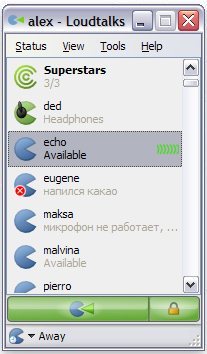
Lets take a look at the features of Loudtalks:
- It has a support for one to many and one to one voice communications
- It has a support for high quality voice
- There is an option with which you can replay all your incoming messages
- You can use it on any computer remotely due to its small size
Sounds pretty simple to use. So what are you waiting for, get this free application, Loudtalks for all your voice communication needs right now!
