• Home
  • Software Testing Service
  • About US
    • Privacy Policy
    • Disclosure
  • Write For Us
  • Submit Software
  • Contact Us
    • Subscribe
I Love Free Software
Best free software available all over the web. The free software categories include Windows Software, Social Networking Tools, and software installation videos.


  • Featured
  • Windows
  • Web Applications
  • App Store
  • Android
  • iPhone
  • iPad
  • Windows 8
  • Social Networking
  • Programming Tools

How To Resize App Icons On Android Home Screen

By Lalit Aggarwal on April 25, 2012 | Sponsored Links

Here are steps to resize app icons on Android Home Screen. This increases available space on your Android home screen, and you can easily add more icons to home screen. We have already covered how to remove labels of app icons on Android home screen. If you do that, as well as reduce size of icons, you can really fit tons of icons on your Android home screen.

Also, big icons on Android home screen don’t look good when you have small screen of your Android phone. Just follow the steps below to resize the app icons on Android home screen. You can even increase or decrease the space between the app icons on your Android. This even lets you add more app icons in the row or column of your Android home screen.

Steps To Reduce Size of App Icons On Android Home Screen:

Step 1: Search and install Go Launcher EX app, or scan the QR code below:

Go Launcher EX QR Code
Sponsored Links

Step 2: Install the launcher on your Android phone.

Step 3: Tap on options and then “preferences”.
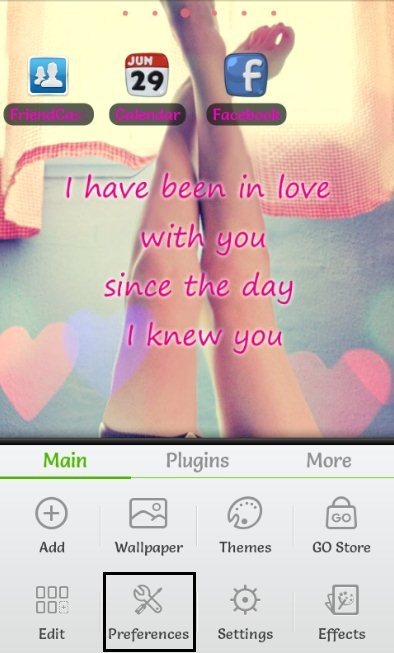
Preferences

Step 5: Open “visual settings” menu to explore launcher options.

Step 6: Tap on “Icons” option in the visual settings menu.

Step 7: You will find “icon size” option in the icons menu of the launcher.
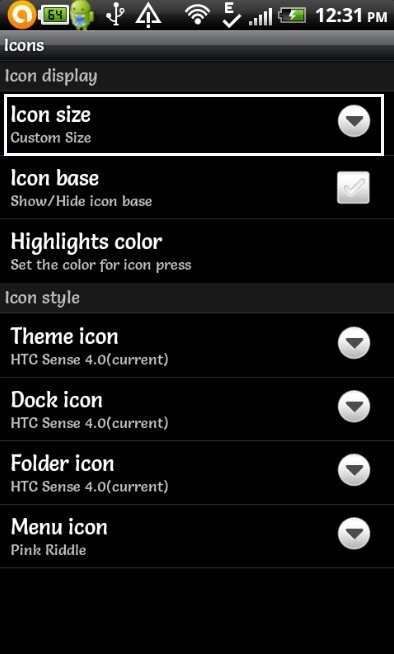
Icon Size Option

Step 8: Select customize size and adjust the app icon size accordingly.

Step 9: Now you will find all your icon size customized accordingly on your Android home screen.
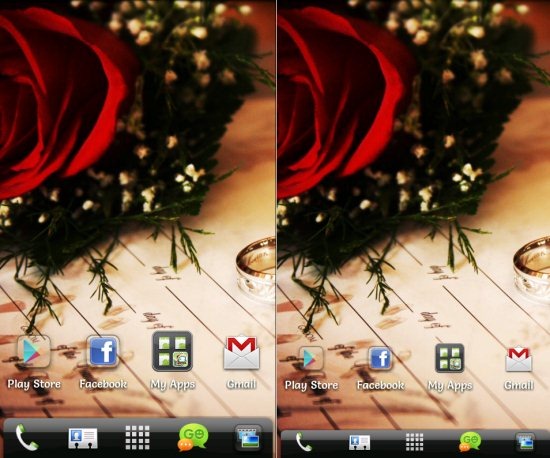
Icon Resized

You can easily customize the grid size of the icons on your Android, so as to add more app icons, when you don’t have enough space on your Android home screen.

You can even check out how to change app icons on Android home screen reviewed by us.

Home Page: Click Here
Works With: Android 2.0 and up

Link to This Page:


You Might Also Like:

  1. How To Remove App Labels On Android Home Screen
  2. How To Add GPS Shortcut Icon On Android Home Screen
  3. How To Change Apps Icon On Android Home Screen
  4. How To Access Favorite Android Apps Directly From Home Screen
  5. How To Access Bluetooth Files Directly From Android Home Screen

Be the first to know about Latest Free Software:

  • Join us on Facebook
  • Subscribe to our RSS Feed
  • Follow us on Twitter
  • Subscribe to Email Updates:

Posted in Android | Tagged android

Lalit Aggarwal

« Previous Next »

Featured Posts

  • 5 Free Snippet Managers To Manage Code Snippets
  • 5 Free Online Tools To Test Website In Different Resolutions
  • 5 Free Microsoft Access Alternatives
  • 5 Free IP Notifier Apps
  • 5 Online Mapping Websites
  • 5 Free Alternatives To iGoogle
  • 7 Websites To Download Windows 8 Themes
  • 5 Best Free Calculator Apps For Windows 8

Join More than 15,000 Followers!

Enter your Email Address
  • Submit Software
  • Software Testing Service
  • Write For Us
  • About Us
  • Privacy Policy
  • Disclosure
  • Contact Us

Link to Us:

Did we review your software here? Feel free to flaunt this badge on your website:

Free Software

Use this Code:

Copyright © 2013 I Love Free Software.

Powered by WordPress and Hybrid. New - H