Voicemail Chimp is a free Android app to send SMS automatically, when any particular call is not answered. This is an awesome app in Android Market to revert to any missed call when you are busy in the form of a text to the caller. With Voicemail Chimp, it becomes easy to convey the caller that you are busy and will not be able to pick the call.
Most of the times it happens that someone calls you for some important work and at that particular time you are unable to pick that call or you are busy somewhere. In these types of situations, this app automatically sends an SMS telling the caller that you are busy somewhere or not available right now.
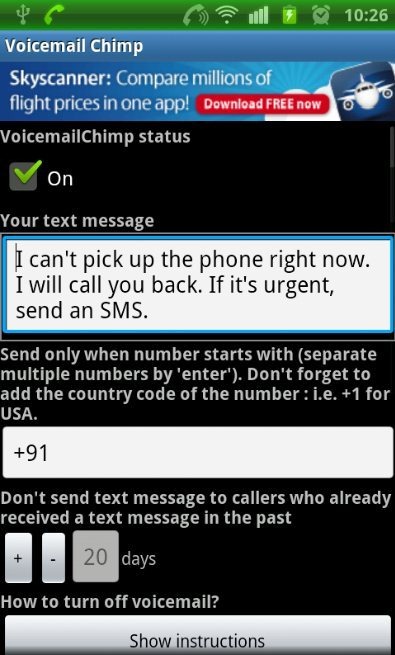
You can customize the text by your choice from within the app so that it will send the text to the caller accordingly.

You can check out Voice Search App for Android reviewed by us.
Note: The SMS that this app sends are not free. They will be charged at the same rates as any other SMS that you send from your phone. So, be aware about that.
Some Key Features Of Voicemail Chimp App For Android:
-
Automatically send the SMS to a particular caller, when you don’t answer any call.
-
Sends the SMS instantly as soon as the call ends.
-
The interface provided by the app is very easy and simple to understand.
-
You can enable/disable the Voicemail Chimp status anytime.
-
Sends the text by your number to the caller.
-
Customize the app according to the country in which you are living. Enter the country code within the app to send the text accordingly.
-
You can also set the minimum, and maximum number of days as same caller should receive the SMS.
Also, check out Yahoo Messenger for Android reviewed by us.
How To Install Voicemail Chimp App On Android:
-
Search for “Voicemail Champ” from Android Market or scan the QR Code below.

-
If you don’t have the Barcode Scanner, then select “Voicemail Chimp” app from the searched list.
-
“Install” the app from Android Market by tapping on “Install” option.
The free Voicemail Chimp app for Android will be automatically installed. Click here to download Voicemail Chimp app from Android Market. Install Voicemail Chimp app on your smart phone and get rid of manually sending the SMS to your callers, conveying them that your are busy in some work.
I tried this app with multiple phone numbers. For one particular number, it never sent SMS, but worked like a charm for all other phone numbers.
Try it out, and let me know what is your experience with this app.
