BatchPurifier is a free software which is used for batch metadata removal from the JPEG format files. A metadata is all the information about a particular file. This software performs metadata removal by removing metadata like XMP, comments, Photoshop image resources, EXIF (geotag and thumbnail) and other data without hampering the quality of an image. A JPEG file metadata includes information like serial number which is unique, date/time on which the photo was taken, digital camera manufacturer, location etc.
JPEG file contains thumbnail of the image and usually when you crop or modify an image, this thumbnail is not modified. Even though if you have hidden some part of the image, the thumbnail would show the complete image. So With this metadata removal software you would be able to completely remove all these unnecessary data that affect your privacy.
Don’t miss to check out free software to remove metadata from photos.
Some Key Features of this Metadata Removal Software:
- Batch metadata removal.
- Easy to understand user interface.
- Removes JPEG metadata like EXIF, IPTC, XMP, ICC profile, JPEG Comments, etc.
- Quality of the image is not affected.
How To Download and Install this Metadata Removal Software:
- Simply Visit the homepage of this metadata removal software.
- Tap the “Download” button.
- A setup gets downloaded into your system.
- Run the Setup and follow further simple instructions for installation.
Also try out Hidden Data Detector reviewed by us.
How to Use this Metadata Removal Software:
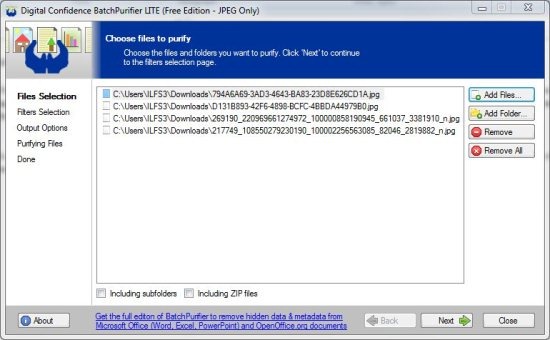
- Add files and folders with the “Add files” and “Add folders” button.

- If you wish to remove a file or remove all files selected, just tap “Remove” or “Remove All” button.
- After adding the files, click on “Next” button below.
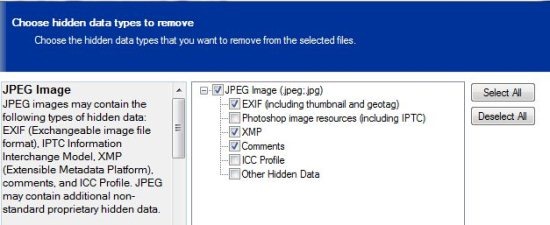
- Choose the Metadata type that you want to remove from the selected files. Then click on “Next” button below.
- Now you need to choose either to overwrite original files or to save the new files in a separate folder.
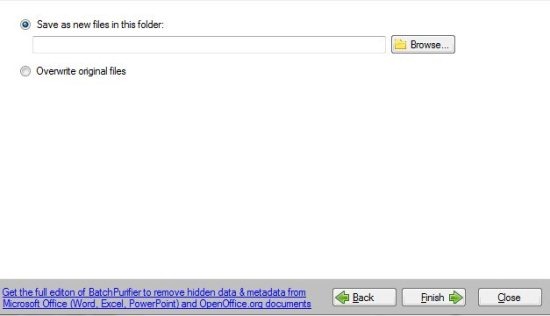
- If you wish to save them, then browse the folder from the “Browse” button and click “Finish”.
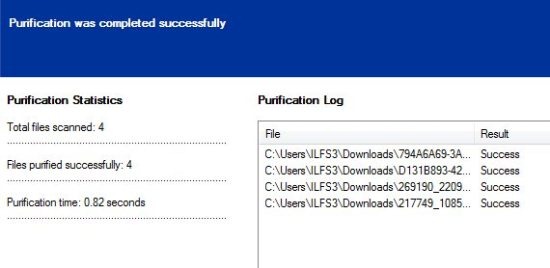
- Now you will come across a windows which says “Purification was completed successfully”. And this window also shows you total scanned files, files which are purified and the purification time.
BatchPurifier is a free software for removing metadata from JPEG Files in a batch. Download this metadata removal software absolutely free.
