Editor Ratings:
User Ratings:
[Total: 0 Average: 0]
iDump is a nice free software that lets you transfer songs from your iPod to your PC without using iTunes. iDump is pretty small in size, and very easy to use. It is just 1 MB in size, and you can even keep it in root folder of your iPod itself. So, you can connect your iPod to any PC to transfer songs, without needing iTunes.
iDump some easy to use features:
It provides an option of unattended songs transfer from your iPod to your computer. In this option you can specify some settings, like what to do if song already exists in the destination folder.
iDump lets you search for songs, and then just copy the selected songs.
iDump lets you copy songs from selected playlists.
You can export playlists as well.
iDump supports English and German.
iDump is a pretty nice tool to transfer songs from your iPod to your computer without using iTunes. However, it does not have other features of iTunes, like syncing data, or copying songs to iPod. If you are looking for full featured replacement for iTunes, you can try Sharepod for Windows, and GtkPod for Linux.
iDump is a free software that lets you transfer songs from your iPod to your PC without using iTunes. iDump is pretty small in size, and very easy to use. It is just 1 MB in size, and you can even keep it in root folder of your iPod itself. So, you can connect your iPod to any PC to transfer songs, without needing iTunes.
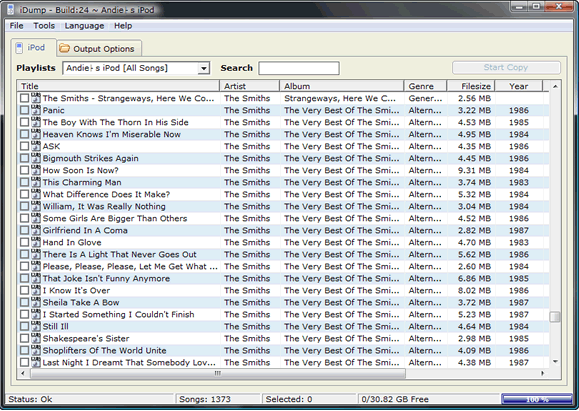
iDump has some easy to use features:
- It provides an option of unattended songs transfer from your iPod to your computer. In this option you can specify some settings, like what to do if song already exists in the destination folder.
- iDump lets you search for songs, and then just copy the selected songs.
- iDump lets you copy songs from selected playlists.
- You can export playlists as well.
- iDump supports English and German.
- Completely Free
iDump is a pretty nice tool to transfer songs from your iPod to your computer without using iTunes. However, it does not have other features of iTunes, like syncing data, or copying songs to iPod. If you are looking for full featured replacement for iTunes, you can try Sharepod for Windows, and GtkPod for Linux.