Update 2022: This website no longer exists. Try some other file sharing service as an alternative.
Ge.tt is a free file sharing tool that lets you share unlimited number of files, without any size restriction on file size. I have reviewed many free file sharing services earlier like Upload Robots, and personal file sharing server. However, all of them come with some sort of restriction. Either they restrict the file size, or number of files that can be shared. But amazingly, Ge.tt does not place any restriction on either of these aspects. So, even if you have a really large file that you want to share with your friends, you can go ahead and share that with this free large file sharing service.
Interestingly, Ge.tt does not even requires you to create an account. To upload a file, just go to Ge.tt, and click on “Share” button, and select the files that you want to upload. It is as simple as that. Of course, you can create a free account as well if you want, and that gives you some additional benefits (that I’ll discuss later).
If these features of Ge.tt have you excited already, wait till you read this:
Ge.tt provides you share URL as soon as you select the file that you want to upload, without even waiting for the file to upload. So, if you are going to share a really large file, you do not have to wait for the file to upload to Ge.tt. Instead, Ge.tt will immediately give you the URL for the file that you can share on Facebook, Twitter, or via emails, and Ge.tt will keep uploading the file in the background (you will need to keep browser window open during that time).
I was quite surprised when I read this, and a bit suspicious as well. So, I decided to load test Ge.tt with a really large file and see its behavior. For that, I chose the Meego Netbook Operating system image that I had recently downloaded. It is an 800 MB file, so it’s a good test file.
I went to Ge.tt, and clicked on “Select” file, and selected this image file from my PC. Within a few seconds, Ge.tt gave me share URL for the file, even though the file was still uploading. See screenshot below:
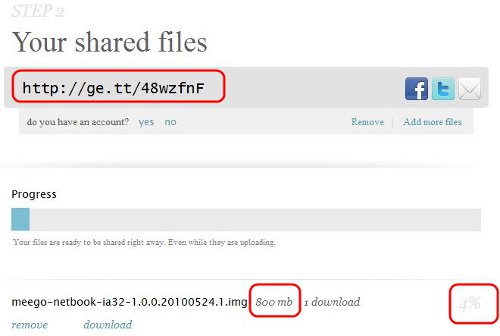
To test it further, I opened another browser, and pasted this URL to see if Ge.tt lets me download this file while it is still uploading. My expectation was that Ge.tt would give me a message that the file is being uploaded and will be ready in a few minutes. Instead, Ge.tt actually let me download that file! So, I had the file being uploaded from one browser window, and was simultaneously being downloaded in the second browser window. That is so awesome.
Ge.tt is the best file sharing service that I have come across. The features are just amazing, and very well thought of.
Coming to the free account of Ge.tt: Ge.tt stores your files for 30 days. However, if you create a free account, then it will delete them after 90 days of inactivity. So, if someone downloads the file every 2-3 months, the file would not be deleted.
Apart from that, a free account of Ge.tt also lets you see real time statistics about your files. You can see exactly how many times the file has been downloaded. These statistics are also in real-time.
Without a doubt, Ge.tt is the best file sharing service around. It could be improved further by giving option of password protection, but I am sure Ge.tt team would be thinking about adding that in future. Great job Ge.tt team. Love it!
