• Home
  • Software Testing Service
  • About US
    • Privacy Policy
    • Disclosure
  • Write For Us
  • Submit Software
  • Contact Us
    • Subscribe
I Love Free Software
Best free software available all over the web. The free software categories include Windows Software, Social Networking Tools, and software installation videos.


  • Featured
  • Windows
  • Web Applications
  • App Store
  • Android
  • iPhone
  • iPad
  • Windows 8
  • Social Networking
  • Programming Tools

How To Find Call Statistics On Android

By Lalit Aggarwal on April 23, 2012 | Sponsored Links

Here, are quick steps to find call statistics on Android. There are situations when you want to find out that how many calls you receive and dial. You want to find out total call duration, that on which contact or number you call the most or from which number you mostly receive the calls. Also, you can find out the call data on daily basis, weekly basis and monthly basis.

You can easily access pie charts and graphs of the call details or call traffic on your Android phone. Along with accessing the call traffic or call details, you can also access the SMS traffic on your Android phone. Now I have all the details on my Android phone that which contact or number I use the most and to who I speak the most on my Android phone.

Steps To Find Call Statistics On Android:

Step 1: Sign-in to Android Market or Google Play Store.

Step 2: With Barcode Scanner app, scan the QR Code below.

PhoneUsage QR Code
Sponsored Links

Step 3: You can also search for “PhoneUsage” app in Google Play Store on your Android phone.

PhoneUsage_thumb

Step 4: Install “PhoneUsage” app on your Android phone.

Step 5: Launch the app on your Android phone to find call statistics.

Step 6: Tap on “Calls” tab in the navigation bar of the app to access call traffic data.

Step 7: Now scroll down and you can see the graphs and Pie chart of total calls traffic on Android.
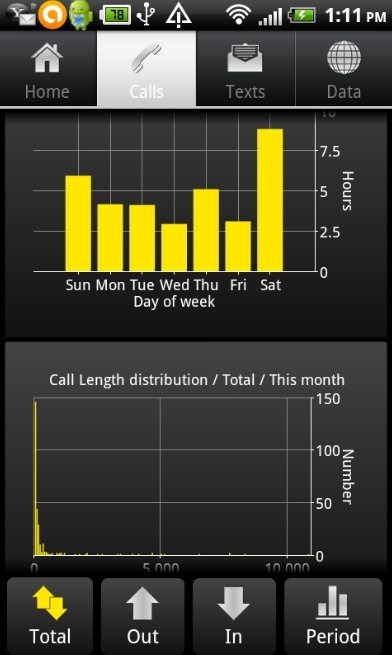
PhoneUsage Call details

Step 8: Tap on “Total” option to find total calls statistics, “out” option to find out call statistics and “In” option to find received calls statistics.

All the information related to call statistics will be displayed in graphical and pie chart presentation. Along with call statistics, you can even easily find out the SMS statistics on your Android. This Android PhoneUsage app is really a smart and nice app which provides accurate data on Android. So install it today, if you are eager to manage your calls and SMS on your Android phone.

Also, you can take a look on how to find space used by applications installed on Android reviewed by us.

Home Page: Click Here
Works With: Android 1.5 and up
Free / Paid: Free

Link to This Page:


You Might Also Like:

  1. Sanity App Android: Free Call Recorder, Call Blocker, SMS Blocker
  2. Missed Call Mailer Android App: Get Missed Call Alerts On Email
  3. Private SMS And Call App To Block Calls And SMS On Android
  4. AndroRec Free Android Call Recorder To Record Calls
  5. How To Backup Contacts, Messages And Call Logs On Android

Be the first to know about Latest Free Software:

  • Join us on Facebook
  • Subscribe to our RSS Feed
  • Follow us on Twitter
  • Subscribe to Email Updates:

Posted in Android | Tagged android | Leave a response

Lalit Aggarwal

« Previous Next »

Featured Posts

  • 5 Free Snippet Managers To Manage Code Snippets
  • 5 Free Online Tools To Test Website In Different Resolutions
  • 5 Free Microsoft Access Alternatives
  • 5 Free IP Notifier Apps
  • 5 Online Mapping Websites
  • 5 Free Alternatives To iGoogle
  • 7 Websites To Download Windows 8 Themes
  • 5 Best Free Calculator Apps For Windows 8

Join More than 15,000 Followers!

Enter your Email Address
  • Submit Software
  • Software Testing Service
  • Write For Us
  • About Us
  • Privacy Policy
  • Disclosure
  • Contact Us

Link to Us:

Did we review your software here? Feel free to flaunt this badge on your website:

Free Software

Use this Code:

Copyright © 2013 I Love Free Software.

Powered by WordPress and Hybrid. New - H