ResophNotes is a free note taking application that helps you to take fast and simple notes on Windows and sync them on Simplenote. You can capture plain text notes with this free note taking utility and sync them to the cloud. If you are familiar with Microsoft OneNote and Evernote, you might find this free note taking utility similar but what makes ResophNotes difference is its user-friendly interface for those who just wants to capture plain text notes and organize them. If you are a Simplenote user then you will be able to synchronize all your notes on Simplenote. All of us keep notes whether they are outlines, blog posts or private thoughts. Over time, these notes can turn into a journal if we can store them securely. This free note taking software helps you to do just that.
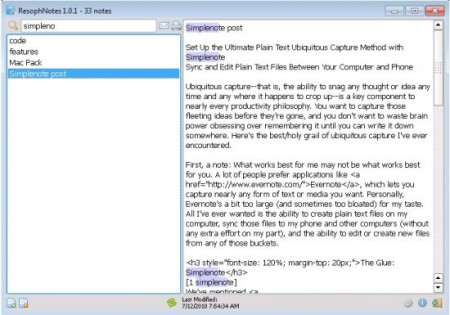
Simplenote is a free online application that helps you to share data across multiple PC and mobile devices. It can be used on various platforms with third party applications and that is where ResophNotes helps us. Generally, ResophNotes is a simple note-taking software designed for Windows like many others. But you can share your notes on multiple mobile devices with ResophNotes as a Simplenote client. Moreover, you don’t have to synchronize it manually to share your notes.
ResophNotes is an effective but simple free note taking application. But one of its unique features is its search function. It’s live which means you can just type your search query and it will start searching to give you instant results. You don’t have to hit enter after typing. You can save your notes with one or more tags which is really effective when you search for them. Moreover, once you sync your notes on Simplenote, you will be able to access them on iPad, iPhone and other mobile devices through Simplenote app.
You can also try KeepNote, Linked Notes and Zim reviewed by us.
Features of ResophNotes:
- Simple & Fast Notes on Windows: you can take notes in a fast and simple way with this freeware. You can nicely organize all your notes with this lightweight application. Don’t worry if you created lots of notes as you can easily find them with ResophNotes’s live search function.
- Sync Online with Simplenote: you can share all your notes across multiple PC and mobile devices once you sync your notes with Simplenote. This freeware supports syncing with Simplenote and you don’t have to do sync manually. All your notes can be accessed from iPad and iPhone with Simplenote’s iOS app.
ResophNotes is available for download at Resoph’s official website. It’s only 7.3MB in size and supports Windows 7, Vista and XP. Download ResophNotes free.
