Any File to Audio Converter is a free audio converting tool that helps you to convert almost any media files into MP3, WAV, OGG, WMA and AAC format. Now you can convert almost any audio or video files into your desired audio format with this free audio converting tool. After converting the files into your preferred audio format, you can send it to your iPod, iPhone or any other device that can play audio files and play the files.
Update (2-Sep-2012): This software is not available anymore, and I am not able to find alternate download links for it. So, you can try out some other audio converters we reviewed earlier like: Hanso converter, free audio extractor, and VSDC Free Audio Converter.
Any file to audio converter is a free audio converting app that works just like its name! It’s not like the other converting tools that work just the opposite of the app name. Like its name, you can convert almost all the audio and video files available around into your preferred and most common audio formats.
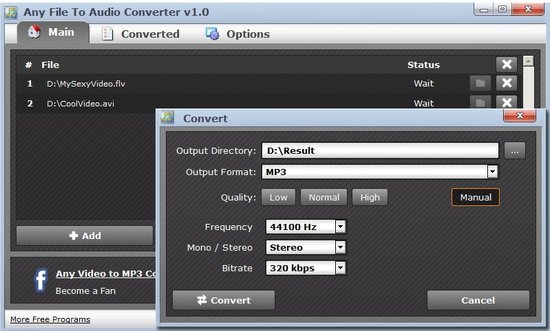
Before converting the files, you can also change the audio settings of output format manually to get your desired audio quality. And the most attractive thing about this software is you don’t have to pay a single penny to use these features that usually comes with a paid program as it’s completely free!
The navigation system of this free audio converting tool is very easy and user-friendly. You will see a file adding option after launching the program with other options. To get started, click on the add option and choose your desired audio or video file you want to get converted. After you are done choosing, click on the covert option. In this convert window, you can choose the output directory, format, quality of the converted file, frequency, stereo or mono option and bitrate.
You can select the quality of the converted files automatically, or click on the manual option to choose your preferred audio settings. Now click on the covert options and you will get your converted files in a very short time!
You can select many files at the same time and convert them simultaneously with this free audio converting app. You can convert MP3, AVI, MOV, 3GP, WMV, MPG, WAV, FLV, MP4, MPEG, WMA, ОGG these files in MP3, OGG, WAV, WMA or AAC format. After adding the files, you can select the audio quality settings manually or automatically. You can send the converted files to any audio playing device to enjoy the converted audio files. This software doesn’t contain any harmful things like spyware or viruses that can be dangerous for your computer.
Click Here to Try this free audio converting app!