PixBuilder Studio is a free desktop-based image editor that is designed for digital photo editing, image processing and resizing. You can also create new images or illusions, and manipulate them with easy color channel. This free image editing software provides various color management functions such as auto-contrast, brightness, color balance, auto-levels, color fill and many more. In order to give an image a professional touch, you can use curves functions.
PixBuilder Studio has an excellent functionality of multi-step undo. With this digital photo editing software, you can also move the tools panel around, for example you can move the panel under the file toolbar from the left sidebar. Layers concept, gradients & masks support, and text layer support all make PixBuilder Studio a nice graphic software. In addition, it also has the functionality of print with preview and save with preview. These functions allow you to create web graphics in any format such as GIF, PNG, Jpeg, or any other popular ones.
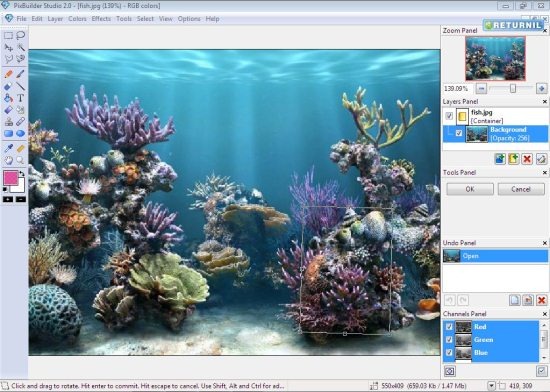
PixBuilder Studio comes up with various attractive features.
Lets check out some of the features that PixBuilder offers:
- Image crop, resize, rotate function
- In-built high quality effects: sharpen effects, blur effects, and more.
- Flexible tools, such as magic wand, transparency masks, single column selection, and more
- Provides layers concept
- A complete set of tools, such as healing brush, the stamp tool, replace color, and many others.
- In-built shape tools such as lines, circles, and rectangles
- Image scanners are supported
Support File Formats:
To read: JPEG, PNG, GIF, BMP, PSD, PCX, TGA, PBS, ICO
To write: JPEG, PNG, GIF, BMP, TGA, PCX, PBS, ICO
However, in order to get started with this excellent photo editor, you need to give a couple of minutes to its download and installation process.
Here is how to Download PixBuilder Studio – Image Editing software:
- Go onto the website
- Click on “Download”
- Double-click on the downloaded icon in order to run the program
- Click on “Run”
- The installer will automatically download the image editor software as your follow-up with the instructions.
Here is your Beautiful Photo Editing Software. Start working on it and create wonderful photos.
Basic System Requirements:
- Windows 7 , Vista, XP.
- CPU 1.4 GHz.
- 512 MB of system memory.
In short, PixBuilder Studio is an excellent photo editor. So go ahead and give it a try.
