• Home
  • Software Testing Service
  • About US
    • Privacy Policy
    • Disclosure
  • Write For Us
  • Submit Software
  • Contact Us
    • Subscribe
I Love Free Software
Best free software available all over the web. The free software categories include Windows Software, Social Networking Tools, and software installation videos.


  • Featured
  • Windows
  • Web Applications
  • App Store
  • Android
  • iPhone
  • iPad
  • Windows 8
  • Social Networking
  • Programming Tools

How To Enable Pattern Lock On Android Phone Without Any App

By Lalit Aggarwal on March 22, 2012 | Sponsored Links

Here, are steps to enable pattern lock on Android phone. Pattern lock is one of the best way to give full security to your Android phone. I really liked this pattern lock on my Android phone.

After applying this lock pattern on my Android phone I really feel good as my phone is fully secured now. This pattern lock comes pre-installed on every Android phone. The question which strikes into mind is how to activate lock pattern on Android without using an app. Below are the steps to enable pattern lock on Android.
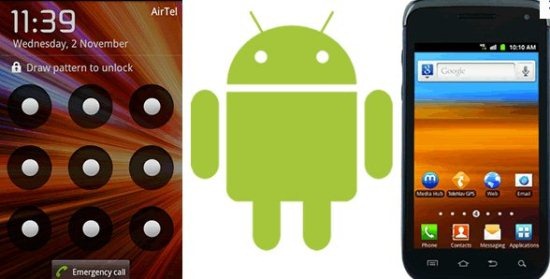
Android Pattern Lock setting
Sponsored Links

Steps To Enable Pattern Lock On Android Phone:

Step 1: Unlock the slide lock of your Android phone.

Step 2: Tap on settings options from your Android phone.
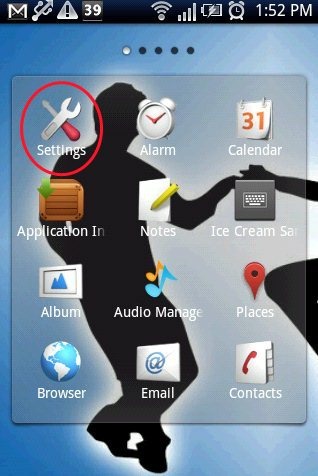
Android Settings

Step 3: In settings menu, tap on location & security option or security option depending on the phone that you are using.
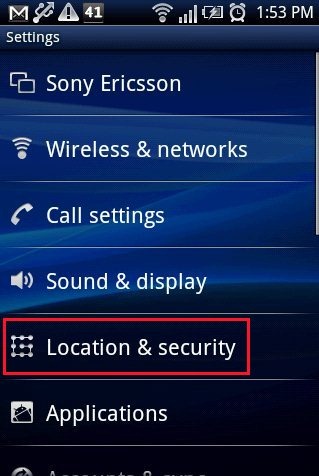
Android Setting Security

Step 4: Tap on “set lock pattern” option on your Android.

Step 5: Set the lock pattern of your choice and then confirm it by drawing the pattern once again.
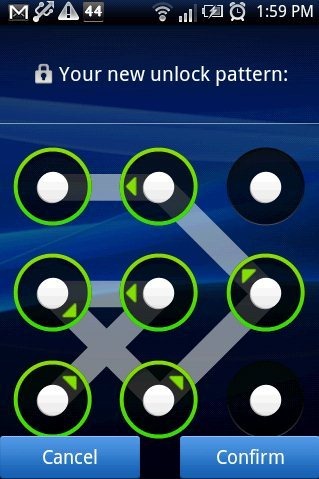
Android Pattern Lock

Step 6: Set the security question and answer. (Available only in some selected devices)
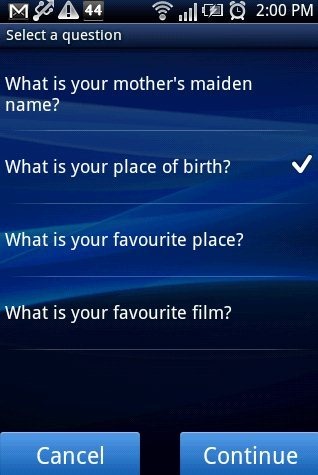
Android Security Question

Step 7: Save the settings on your Android phone.

Step 8: Now you will see the pattern lock activated on your Android phone.

The lock pattern system installed on your Android phone also gives you the option to set visible and invisible pattern lock on Android. Invisible pattern lock provides extra security to your phone. If you have activated invisible pattern lock and even if you unlock your Android phone in front of any other person, that person will not be able to learn the pattern lock you have set.

Also, check out how to sync Android phone with PC reviewed by us.

This is the easiest way to secure your Adroid phone from other people. Go ahead and try this pattern lock free.

Link to This Page:


You Might Also Like:

  1. How To Enable Pattern Lock With Go Locker App On Android
  2. 5 Best Free Android Pattern Lock Apps
  3. Enable Widget On Android Lock Screen: Widget Lock
  4. How To Set mp3 As Ringtone On Android Phone
  5. Android App Lock To Lock Applications On Android

Be the first to know about Latest Free Software:

  • Join us on Facebook
  • Subscribe to our RSS Feed
  • Follow us on Twitter
  • Subscribe to Email Updates:

Posted in Android | Tagged android | Leave a response

Lalit Aggarwal

« Previous Next »

Featured Posts

  • Top 7 Free Launchers for Android
  • 5 Free Snippet Managers To Manage Code Snippets
  • 5 Free Online Tools To Test Website In Different Resolutions
  • 5 Free Microsoft Access Alternatives
  • 5 Free IP Notifier Apps
  • 5 Online Mapping Websites
  • 5 Free Alternatives To iGoogle
  • 7 Websites To Download Windows 8 Themes

Join More than 15,000 Followers!

Enter your Email Address
  • Submit Software
  • Software Testing Service
  • Write For Us
  • About Us
  • Privacy Policy
  • Disclosure
  • Contact Us

Link to Us:

Did we review your software here? Feel free to flaunt this badge on your website:

Free Software

Use this Code:

Copyright © 2013 I Love Free Software.

Powered by WordPress and Hybrid. New - H