• Home
  • Software Testing Service
  • About US
    • Privacy Policy
    • Disclosure
  • Write For Us
  • Submit Software
  • Contact Us
    • Subscribe
I Love Free Software
Best free software available all over the web. The free software categories include Windows Software, Social Networking Tools, and software installation videos.


  • Featured
  • Windows
  • Web Applications
  • App Store
  • Android
  • iPhone
  • iPad
  • Windows 8
  • Social Networking
  • Programming Tools

EasyNetMonitor: Monitor Online Status of Computer or Website

By Ishan Bansal on February 21, 2011 | Sponsored Links

EasyNetMonitor is a freeware to check online status of any computer or website. It sits in your system tray, and you can click on the system tray icon to see that all the computers and websites are online.

EasyNetMonitor comes with just one file that can be downloaded and used. The file size is 90 kb only. You do not even need to install this software, just double click on the file to run.

Once you run the file, you will see icon for EasyNetMonitor in your system tray.
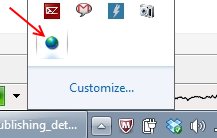
EasyNetMonitor System tray
Sponsored Links

Just right click on that icon, and select option of “Add”. This will bring up a pop-up window in which you can add website address that you want to monitor, or any IP that you want to monitor. You can even provide a nickname for that.
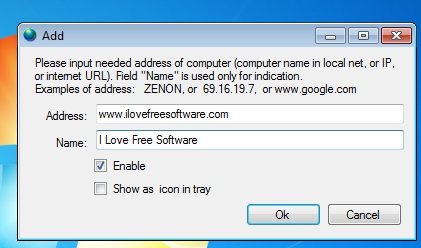
EasyNetMonitor Add

After that, EasyNetMonitor will keep monitoring that website or IP. To check online status of that website, just right click on the system tray icon, and you can immediately see online status.
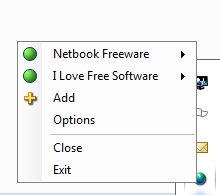
EasyNetMonitor

The free version of EasyNetMonitor allows you to monitor up to 2 websites or computers.

Even though EasyNetMonitor is quite easy to setup and use, it has one basic flaw: it does not alerts you if the website or PC goes down. You have to manually check system tray icon whenever you want to see online status. This means that it should not be used to monitor production websites, or important computers, and is good for checking non-mission critical websites or computers. For monitoring production websites, you can use free website uptime monitoring service, and Free Ping test tool.

Download EasyNetMonitor free.

Home Page: Click Here
Works With: Windows
Free / Paid: Free

Link to This Page:


You Might Also Like:

  1. Websites Cop: Monitor Website for Unauthorized Changes
  2. Free Software to Monitor Uptime of Websites: Site Monitor
  3. Monitor Website For Changes Using ChangeDetection
  4. Free Unlimited Website Uptime Monitor: StatusCake
  5. Monitor Website Changes free: Versionista

Be the first to know about Latest Free Software:

  • Join us on Facebook
  • Subscribe to our RSS Feed
  • Follow us on Twitter
  • Subscribe to Email Updates:

Posted in Network Tools | Tagged easynetmonitor | Leave a response

Ishan Bansal

« Previous Next »

Featured Posts

  • Top 7 Free Launchers for Android
  • 5 Free Snippet Managers To Manage Code Snippets
  • 5 Free Online Tools To Test Website In Different Resolutions
  • 5 Free Microsoft Access Alternatives
  • 5 Free IP Notifier Apps
  • 5 Online Mapping Websites
  • 5 Free Alternatives To iGoogle
  • 7 Websites To Download Windows 8 Themes

Join More than 15,000 Followers!

Enter your Email Address
  • Submit Software
  • Software Testing Service
  • Write For Us
  • About Us
  • Privacy Policy
  • Disclosure
  • Contact Us

Link to Us:

Did we review your software here? Feel free to flaunt this badge on your website:

Free Software

Use this Code:

Copyright © 2013 I Love Free Software.

Powered by WordPress and Hybrid. New - H