Picacha is a free screenshot software which enables you to share the screenshots online. The software is very simple to use and has a host of other features related to screenshots.
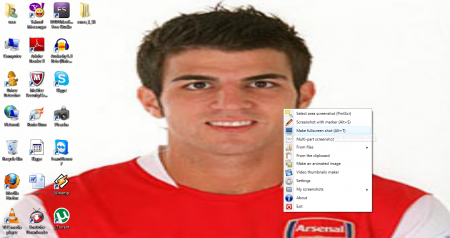
There are not many software which enable you to click a screenshot and share it online. Picacha helps you to reduce on the donkey work needed to edit a screenshot, modify it and then send the link online. Not only does the Software allow you to click screenshots, but it even gives you the ability to make animation out of these images.
The Features of The program are:
- Ability to create a screenshot within three clicks.
- There is an extra option of creating a screenshot with a Marker.
- Link to the screenshot can be shared online.
- Animation of multiple screenshots can be created.
- Quality screenshots of Video files can be made.
- Various screenshots can be combined to create a Multipart Screenshot.
Interface and Working of this share screenshots online Software
Picacha sits up in the taskbar tray as an icon. It’s pretty simple to use and has a convenient feature set for the user. The main option is to create a screenshot, which gets stored in the directory folder. You can create a screenshot with Marker too, as this serves as the editing feature. Several screenshots could be blended to create a Multipart screenshot too! Even Video thumbnails or Screen animations can be produced using the Software. The software is pretty simple to use and is concentrated on the Screenshot feature.

Downloading and Installation
The software gets downloaded pretty quickly. Size of Picacha installation file is of somewhere around 1 MB. The installation process is also quite fast.

Final Verdict
Picacha is a brilliant software for creating Screenshots and even editing them according to your own convenience. If you do not want to use the tedious method of referring to Paint for clicking Screenshots, Picacha may just be the right option for you!
