• Home
  • Software Testing Service
  • About US
    • Privacy Policy
    • Disclosure
  • Write For Us
  • Submit Software
  • Contact Us
    • Subscribe
I Love Free Software
Best free software available all over the web. The free software categories include Windows Software, Social Networking Tools, and software installation videos.


  • Featured
  • Windows
  • Web Applications
  • App Store
  • Android
  • iPhone
  • iPad
  • Windows 8
  • Social Networking
  • Programming Tools

Windows Live Movie Maker: Create Movies from your Photos and Video Clips and Share on YouTube

By Ishan Bansal on September 20, 2009 | Sponsored Links

Windows Live Movie Maker is a nice free software to create movies from your video clips and your photos. It is specially geared towards home and casual users to make movie making a snap for them.
Windows Live Movie Maker is a complete end to end solution right from making movies, providing all sort of simple to use editing tools, and then providing tools to share your moviews. You can add songs, add transitions to your movies, and upload them to YouTube, or even burn DVD with them. All for free! Really good.
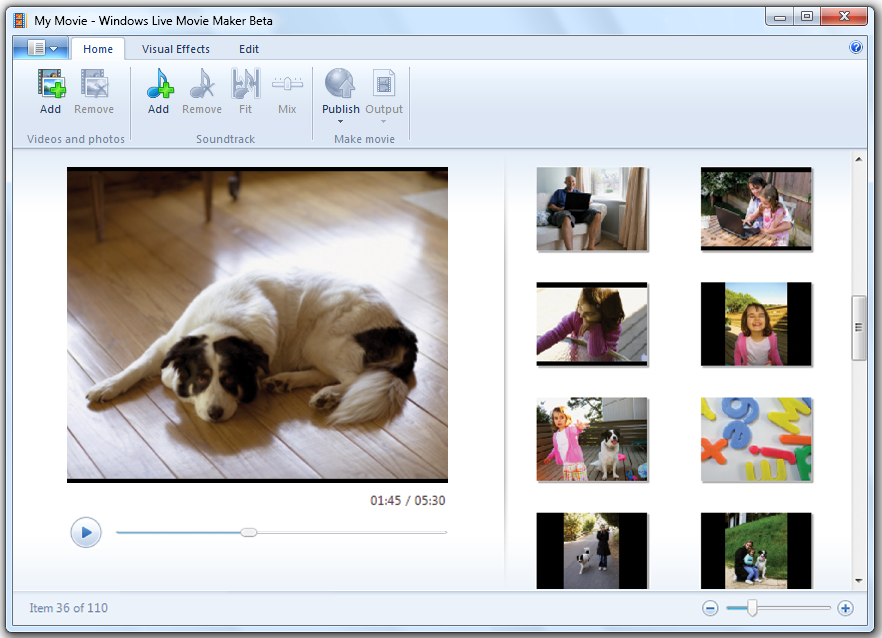
Windows Live Movie Maker provides Ribbon like interface like Office 2007 applications, so all the menu items are easy to use and very intuitive. To start creating movies, you start by selecting the video clips and photos that you want to include in your movie. You can select video clips, or photos, or both in the same movie. Windows Live Movie Maker also gives you options to add songs to your movie by selecting songs from your hard disk.
Once you have selected your video clips and photos, you can arrange all of them in form of story board. You can select start and end point of each video clip, transitions and zoom effects for your photos, and start and end points for your songs. Their sequence on movie will be as you lay them out on story board.
Windows Live Movie Maker also provides nice editing tools for movies and photos. You can trim them, and add some nice effects to make them look as you want. The great part of Windows Live Movie Maker is that all the tools have been kept very simple to use so that casual users can use it easily, and make some great home movies.
Once you done with editing your photos and clips, and have arranged them on your story board, you just need to hit the movie creation button. Windows Live Movie Maker will create a nice movie for you, complete with Titles, transitions, and all the effects that you added. Even after the movie is created, you edit the movies if anything doesn’t looks good.
After your movie is done, there are many ways you can share your movies with your frieds:
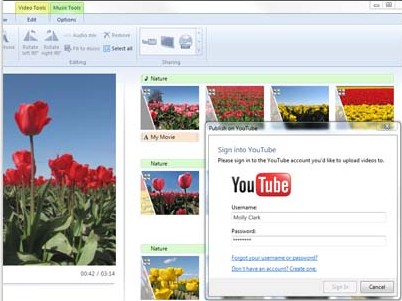
You can directly upload them to YouTube from inside Windows Live Movie Maker.
You can upload them to Facebook from inside Windows Live Movie Maker.
You can email them to friends.
You can burn them to DVD
You can convert them into mobile friendly format.
You can store them in HD format for your TV.
All the above options are available inside Windows Live Movie Maker itself. Burning movies on DVD needs Windows DVD Maker.
Windows Live Movie Maker is really good, comes with plenty of features, and is completely free. This is definitely one of the best free tools out there to create free movies. Download links, and Video Tutorials at the end.

Works on: Windows Vista, Windows 7

Windows Live Movie Maker is a nice free software to create movies from your video clips and your photos. It is specially geared towards home and casual users to make movie making a snap for them.

Windows Live Movie Maker is a complete end to end solution right from making movies, providing all sort of simple to use editing tools, and then providing tools to share your moviews. You can add songs, add transitions to your movies, and upload them to YouTube, or even burn DVD with them. All for free! Really good.

Windows Live Movie Maker
Sponsored Links

Windows Live Movie Maker provides Ribbon like interface like Office 2007 applications, so all the menu items are easy to use and very intuitive. To start creating movies, you start by selecting the video clips and photos that you want to include in your movie. You can select video clips, or photos, or both in the same movie. Windows Live Movie Maker also gives you options to add songs to your movie by selecting songs from your hard disk.

Once you have selected your video clips and photos, you can arrange all of them in form of story board. You can select start and end point of each video clip, transitions and zoom effects for your photos, and start and end points for your songs. Their sequence on movie will be as you lay them out on story board.

Windows Live Movie Maker also provides nice editing tools for movies and photos. You can trim them, and add some nice effects to make them look as you want. The great part of Windows Live Movie Maker is that all the tools have been kept very simple to use so that casual users can use it easily, and make some great home movies.

Once you done with editing your photos and clips, and have arranged them on your story board, you just need to hit the movie creation button. Windows Live Movie Maker will create a nice movie for you, complete with Titles, transitions, and all the effects that you added. Even after the movie is created, you edit the movies if anything doesn’t looks good.

After your movie is done, there are many ways you can share your movies with your frieds:

Windows Live Movie Maker Upload to YouTube

  • You can directly upload them to YouTube from inside Windows Live Movie Maker.
  • You can upload them to Facebook from inside Windows Live Movie Maker.
  • You can email them to friends.
  • You can burn them to DVD
  • You can convert them into mobile friendly format.
  • You can store them in HD format for your TV.

All the above options are available inside Windows Live Movie Maker itself. Burning movies on DVD needs Windows DVD Maker.

Windows Live Movie Maker is really good, comes with plenty of features, and is completely free. This is definitely one of the best free tools out there to create free movies.

Windows Live Movie Maker works only with Windows Vista, and Windows 7. It does not works with XP, or earlier versions of Windows. Download links, and Video Tutorials at the end.

Download:

Download Link: Download Windows Live Movie Maker Free

Video Tutorial: How to Create Movies using Windows Live Movie Maker


Link to This Page:


You Might Also Like:

  1. Create Movies from Photos and Video Clips: ffDiaporama
  2. Free Movie Maker Software: Youtube Movie Maker
  3. LiveUpload: Upload Photos to Facebook from Windows Live Photo Gallery
  4. Make Video Clips with Photos in 3 Simple Steps: PhotoFilmStrip
  5. DVD Knife: Free DVD Cutter to Extract DVD Clips

Be the first to know about Latest Free Software:

  • Join us on Facebook
  • Subscribe to our RSS Feed
  • Follow us on Twitter
  • Subscribe to Email Updates:

Posted in Video Software | Tagged create home movies, create movies, create movies from photos, edit movies, free movie creator, free software to edit movies, movie maker, upload movies to youtube, windows live, Windows Live Movie Maker | Leave a response

Ishan Bansal

« Previous Next »

Featured Posts

  • 5 Free Snippet Managers To Manage Code Snippets
  • 5 Free Online Tools To Test Website In Different Resolutions
  • 5 Free Microsoft Access Alternatives
  • 5 Free IP Notifier Apps
  • 5 Online Mapping Websites
  • 5 Free Alternatives To iGoogle
  • 7 Websites To Download Windows 8 Themes
  • 5 Best Free Calculator Apps For Windows 8

Join More than 15,000 Followers!

Enter your Email Address
  • Submit Software
  • Software Testing Service
  • Write For Us
  • About Us
  • Privacy Policy
  • Disclosure
  • Contact Us

Link to Us:

Did we review your software here? Feel free to flaunt this badge on your website:

Free Software

Use this Code:

Copyright © 2013 I Love Free Software.

Powered by WordPress and Hybrid. New - H