NoteItDown from Gaijin is a free to download, portable and easy to use application used for creating and managing various kinds of notes in a compact interface. This little app works on USB sticks as well as on multiple user environments. This product from Gaijin comes with a lot of inbuilt features which are discussed in the following sections.

Features of this notes creating software:
Portability:
This software, once installed onto your computer hard disk, can be easily transferred using any media to some other machine and it would work perfectly on the destination machine. This makes it easier for users to make the software available to multiple machines.
Language Support:
NoteItDown supports a variety of languages namely English, Catalan, Dutch, German, Russian, Japanese, Polish, Spanish, French and Swedish. This vast language compatibility enables users from different portions of the world to interact and use this product.
Interface
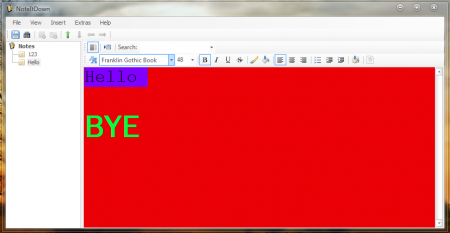
This application has got a simple and user friendly interface with two major sections. One being the work area where the user can create and edit notes, and the second section located to the extreme left of the screen, allows the user to manage various types of notes.
Editing Tools
NoteItDown comes with some new features in addition to the ones present in a normal Note creating application like Microsoft Notepad. This app allows the user to change font type, font size, font color and font styles (Bold, Italic, Underline and Strikeout). The user can also change the alignment of texts, add indentation, and make text appear list wise and many more. The background color of different notes can also be set according to the user’s choice. Moreover, the word wrap feature can also be switched on or off.
Other Features
- The various created notes can be saved in a folder structure as defined by the user.
- This being an RTF (Rich Text Format) Editor, each note can be edited and designed individually.
- A note which has been edited is saved automatically thus saving the user a lot of trouble having to save the note at regular intervals.
- NoteItDown comes with an inbuilt search bar which allows the user to find notes with the required text. Moreover, portions of text inside a note can also be searched for by using this search function.
Download and Installation
This latest version of this software (version 1.3), released on the 18th April, 2012 can be downloaded free of cost from the Gaijin website by following this link. The downloadable RAR file is 105KB in size. After download, all the user needs to do is to extract the files into some suitable folder and then execute the ‘NoteItDown.exe’ file. NoteItDown works on all Windows platforms and requires Microsoft .NET Framework 2.0 to be installed.
The Final Verdict
This free, portable and easy to use software NoteItDown works pretty well and can be used for different text typing and editing operations. The editing tools with which this software comes is quite limited if one compares it with the other major Text editing applications. Nevertheless, the small size and portability feature of NoteItDown makes it a great software to work with for small kinds of work.
