• Home
  • Software Testing Service
  • About US
    • Privacy Policy
    • Disclosure
  • Write For Us
  • Submit Software
  • Contact Us
    • Subscribe
I Love Free Software
Best free software available all over the web. The free software categories include Windows Software, Social Networking Tools, and software installation videos.


  • Featured
  • Windows
  • Web Applications
  • App Store
  • Android
  • iPhone
  • iPad
  • Windows 8
  • Social Networking
  • Programming Tools

Timer Program: WatchMe

By Deepika Arora on September 17, 2011 | Sponsored Links

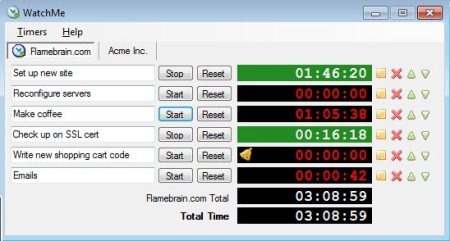
WatchMe is a free desktop timer software that is generally used to time various tasks you perform together or independently. Basically, it is a time tracking software. It allows you to name each timer and also record information about the task you are timing.

WatchMe is quite a useful program for the people who are required to track their time for hourly billing, timesheets and much more. It comes up with various attractive features.

Lets check out the features WatchMe offers:

  • Manage multiple timers together
  • Clutch Timers into multiple tabs
  • Assign a unique name to each timer
  • Shows time in various formats
  • Quickly copy and paste time into other time tracking programs
  • Timer alerts notifies you after a set period of time runs out
  • Indicate timers with different colors that helps to organize your tasks efficiently

However, in order to get accessed with WatchMe, you need to give a couple of seconds to its download and run process.

Here is how to download and run WatchMe:

  1. Go onto the website linked below
  2. Click on “Download”
  3. Double-Click the downloaded icon
  4. Since it is Zip-File, hence, you need to extract it. Therefore, click on the last file.
  5. Click on “Extract All”
  6. Click on “Extract”
  7. It has been extracted. Now click on WatchMe icon in order to run the program.
  8. Click on “Run”

Yup…its done. Start accessing. You can take a look at an image below in order to get familiar with it:
watchme
Sponsored Links

It is recommended that you add notes to each time in order to keep a track on what tasks are you performing. WatchMe works efficiently with:

  • Windows XP, Windows Vista, Windows 7
  • Microsoft .NET Framework 2.0 or higher

Take a look at other Timers reviewed by us: Timer Software, and Countdown Timer.

In short, WatchMe is a nice time tracker that helps you to give time to each task your perform. A must for all of those who are working on an hourly basis. Go ahead and download timer right away!!

Home Page: Click Here
Works With: Windows XP, Windows Vista, Windows 7, Microsoft .NET Framework 2.0 or higher
Free / Paid: Free

Link to This Page:


You Might Also Like:

  1. Setup Multiple Timers to Track Time Spent on Multiple Tasks
  2. Online Countdown Timer And Egg Timer: E.ggtimer
  3. Free Timer Software For Windows: Free Desktop Timer
  4. Free Task Timer to Record Duration of a Task: Light Tasks
  5. Web Timer Extension For Chrome: Record Time Spent on Various Websites

Be the first to know about Latest Free Software:

  • Join us on Facebook
  • Subscribe to our RSS Feed
  • Follow us on Twitter
  • Subscribe to Email Updates:

Posted in Desktop Enhancement | Tagged hourly basis, stopwatch, time tracker, time tracking software, timer, timer software, timesheet, timesheets | Leave a response

Deepika Arora

« Previous Next »

Featured Posts

  • 5 Free Snippet Managers To Manage Code Snippets
  • 5 Free Online Tools To Test Website In Different Resolutions
  • 5 Free Microsoft Access Alternatives
  • 5 Free IP Notifier Apps
  • 5 Online Mapping Websites
  • 5 Free Alternatives To iGoogle
  • 7 Websites To Download Windows 8 Themes
  • 5 Best Free Calculator Apps For Windows 8

Join More than 15,000 Followers!

Enter your Email Address
  • Submit Software
  • Software Testing Service
  • Write For Us
  • About Us
  • Privacy Policy
  • Disclosure
  • Contact Us

Link to Us:

Did we review your software here? Feel free to flaunt this badge on your website:

Free Software

Use this Code:

Copyright © 2013 I Love Free Software.

Powered by WordPress and Hybrid. New - H