Here is quick tutorial to backup contacts, messages and call logs on Android. Making a backup of data is very mandatory for all of us using Android or normal phones. At the time of using phone we all have some messages, contacts and call logs saved on the phone.
Update: The Go Backup app is no longer available in Google Play Store. Check out Android SMS Backup app reviewed by us.
No one wants that their long time collection of their contacts, call logs and messages should be deleted by mistake. So you should have a backup of contacts, messages and call logs. If you have an Android phone with you then backing up your contacts, messages and call logs is not a very complex or big task to perform on Android phone. So below are the steps to backup contacts, messages and call logs on Android phone.
Steps To Backup Contacts, Messages And Call Logs On Android Phone:
Step 1: Login to Google Play Store on your Android phone.
Step 2: Install Go Launcher EX app on your Android phone.
Step 3: Apply Go launcher EX app on your Android phone.
Step 4: Install Go Backup app on your Android phone.

Step 5: Launch Go Backup app on your Android.
Step 6: Tap on “backup” option in the app.
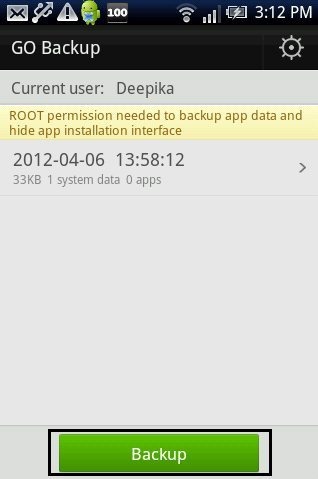
Step 7: Check mark on messages, call logs and contacts option to create a backup for all of them.
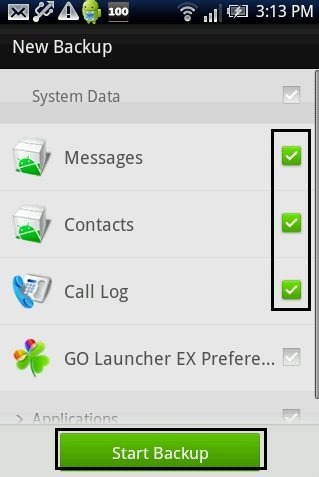
Step 8: Tap on “Start backup” option in the app.
This will automatically create backup on your Android phone for all your messages, contacts and call logs. You can also create backup for app data from Go Backup app. But to create backup for all your app data, you need to have your Android phone rooted.
The app also allows you to restore the backed up messages, contacts and call logs on your Android phone. I really liked the app after installing it on my Android phone. Now I won’t care even if my data (contacts, messaged and call logs) gets deleted from my Android phone. I fully backed up all my data on my Android phone.
