MediaMonkey is a free music management software available for Windows PC. In MediaMonkey you can manage music, listen to podcasts, download music, sync portable devices, and much more.
All of us normally have tons of songs on our hard disk, but it becomes very difficult to effectively manage all the music. That’s where Music Management Software comes into picture. It manages all kinds of music on your hard drive and provides one simple interface to access all your music.
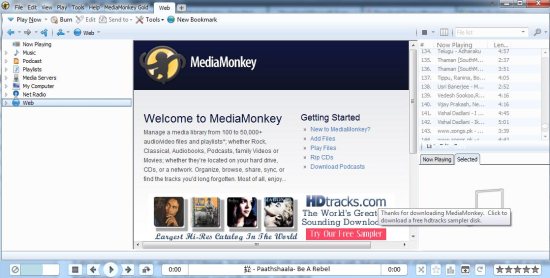
About MediaMonkey:
When you install MediaMonkey, it scans your hard disk for all type of music files. It catalogs CD’s, AAC, OGG, WMA, FLAC, MP3, and other audio files, including contemporary and classical music, audiobooks, podcasts, etc. It also includes a CD ripper, and a CD/DVD Burner. Its player comes with a party mode as well, that provides lot of party specific functionalities, such as locking down UI.
Features Of MediaMonkey:
There are many cool features of MediaMonkey:
1. Music: This music management software can manage videos and audios of formats like: mp3, aac, ogg, wma, flac, mpc, wav, cda, avi, mp4, ogv, mpeg, wmv, m3u, pls, etc. The music is categorized according to location, artist, album, composer, genre, etc. You can also edit music files from here. Mediamonkey has an auto organizer which can organize your audio files and rename them. You can auto tag the files or update their covers from web also. Just right click on a file and choose the options available.
2. Podcasts: In this free music management software you can organize and download your podcasts also. Just go to the podcasts section and click on subscription option to add podcasts of your choice by choosing new podcast option as shown below.
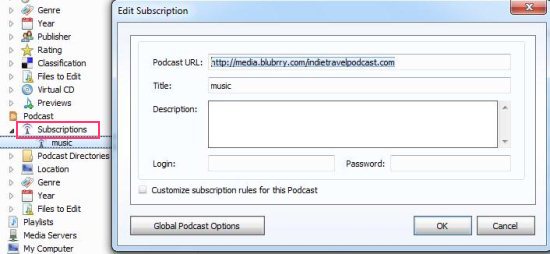
You can manage podcast directories, location, edit podcast files, etc. You can also download your favorite podcasts to your hard drive.
3. Browse songs by directories: You can browse the music and video files directly from the player and play them. MediaMonkey also provides syncing between your audio devices, such as iPod, iPhone, Android, and other portable devices. If external devices are connected then you can manage the music files from here only.
4. Net Radio: You can access the net radio from this player. There are two directories namely: shoutcast and icecast. You can download the files also.
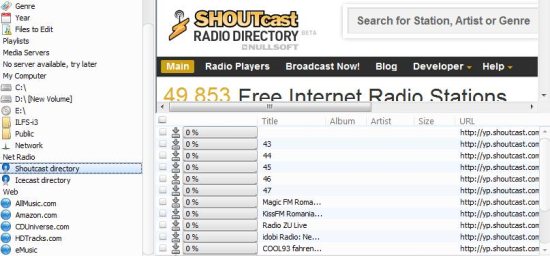
5. Web: You can access various music websites and listen to the songs or download them from here.
The interface is very well thought of, and completely functional. It is really one of the Best audio media manager out there.
All in all, MediaMonkey is one great FREE Music Management Software.
