Search My Files is a free and powerful duplicate file finder tool which can be used to track or find duplicate files gathered on your system. Not only does it search for the files but it can also edit, copy, move and even erase the selected files. As searching is the focal point of this duplicate file finder, it uses detailed filtering options in its searching process.
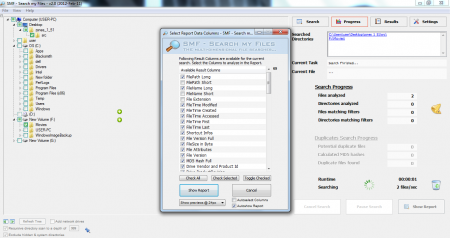
Searching for duplicate files based on the normally available Search option can prove quite taxing! It’s options are limited and it is not comprehensive enough. Neither can it be used for other purposes apart from searching. Search My Files provides a detailed list of attributes related to a particular file making it easy for the user.
Features Of This Duplicate File Finder:
- It’s an extensive file searching software.
- Apart from the normal file searching capabilities, other options also exist. You can copy, move, delete and even preview duplicate files.
- File attributes pertaining to a particular file can be set.
- File information to collect, can be categorized into 30 different types.
- Filtering by the finest attributes is made available.
- For audio or video files, search can be made with respect to length, artist or even the bit rate!
- Images can be searched based on their file size or dimension.
Interface And Working Of This Duplicate File Finder:
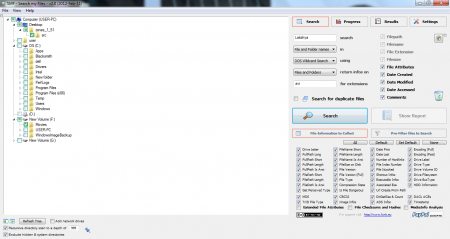
The free duplicate file finder is very detailed in its approach and I expected a complex interface design. The view is made in explorer style and that helps you to get familiarized with the working of this duplicate file finder. There are multiple tabs and wide variety of options available at your disposal.
The main working interface contains the drive information on the left hand side panel. The entire Search system is on the right side. You can type in the search keyword and then set the various parameters available at your disposal. There are two options present: File Information to Collect and Pre-Filter Files to Search. Both have an extensive search filter options array associated with themselves.
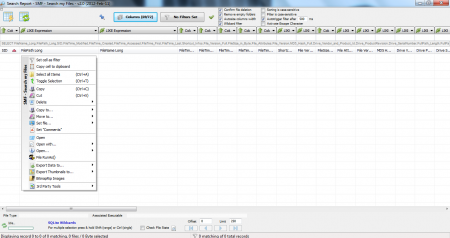
After clicking the search tab with the existing parameters a Search report is generated. It’s based on the File Information to Collect and is displayed in a tabular form. For the displayed results you can select the operation that you may prefer. You can copy, delete or search for duplicate content. Even file attributes can be set.
Downloading And Installation Of This Duplicate File Finder:
The duplicate file finder is available for downloading as a Zip file. After extracting and opening it; there is an application icon present. Double clicking the icon launches the software. No special setup file or space required.

Final Verdict
Search My Files is extremely versatile and is a great improvement on the Windows Search option. For those who prefer to filter their search results minutely and wish to perform various operations on the same Search My Files may just be perfect for them.
