Doro PDF Writer is a free PDF writer that allows users to create PDF files from any Windows program. It installs as a virtual printer that allows PDF file creation from any Windows program that has “Print” option. The advantages Doro PDF Writer over other PDF writers are immense. Currently it is available in four languages: English, French, German and Portuguese.
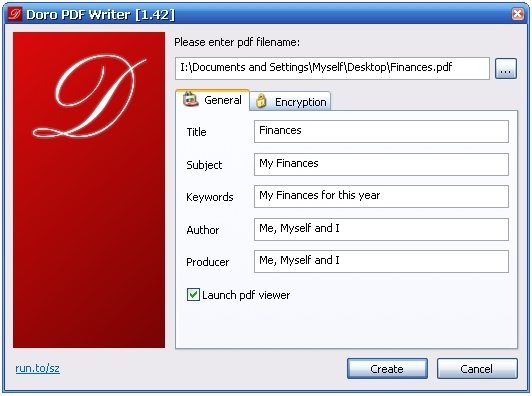
How to Create a PDF File:
An example of creating a PDF file from a windows application such as Microsoft Word can be demonstrated in the following way:
- The first step is to open a new Word file.
- The user can include content of any form such as text, colored pictures etc
- After completing the Word file, the user has to click the print dialog and then select the printer labeled ‘Doro PDF Writer’ and press ‘OK’.
- The user can specify some additional options on the Doro window which appears after that.
- Once the user specifies his required options, the ‘create’ button has to be clicked.
- The process results in the creation of a colored pdf file.
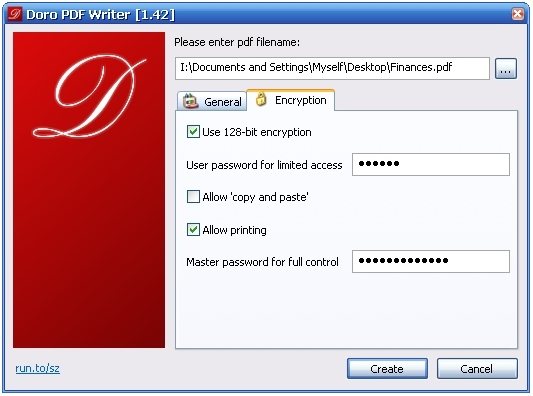
The Doro PDF Writer supports encryption which prevents further printing and plagiarism. The encryption is achieved by using 128-bit password protection.
Some other PDF printers we reviewed earlier include: PDF 24, PDF reDirect, and Lightning PDF Printer.
The operating system requirements are as follows: Windows 7 [32 and 64 Bit] / Vista [32 and 64 Bit] / 2003 Server [incl. Terminal Services / Citrix XenApp with multiple concurrent users] [32 and 64 Bit] / XP [32 and 64 Bit] / 2000 / NT4 and Windows ME / 98SE / 98 / 95. The user has to download the software and install it on their system. On installation the Doro PDF Writer option automatically appears in the print dialog. The user can specify whether they would like to utilize the 128-bit encryption or not while installing the software.
Doro PDF Writer allows you to print even non standard fonts as bitmaps. The Threshold to switch between downloading bitmap or outline font can be reduced by changing the settings as follows. In the Control Panel, the user can go to Printers and select the Doro PDF Writer option, followed by Properties, Fonts where in the user can select Send Fonts As option.
Download Doro PDF Writer free.
