J7Z is a free software that offers an alternative, yet attractive GUI for 7zip. 7-Zip is one of the best free file archiving software. This is also our personal favorite in our list of winzip alternatives. However, 7-zip does not comes with a nice GUI. A simple solution for that is J7Z. J7Z is basically a GUI for 7-zip that allows you to access various functions of 7-Zip from a GUI. This free 7zip GUI let’s you create or simply extract protected archives effortlessly. As it sits in your context menu, you can choose between create or extract option from the context menu itself.
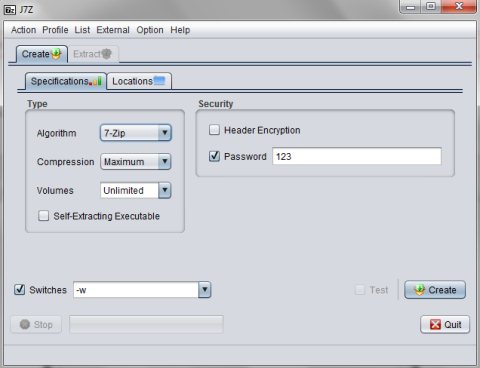
While creating archives, you are allowed to choose the algorithm type, compression type, volumes, etc. In addition, you are even allowed to choose your desired location for saving the created archives and you can even password protect an archive that you create. For extracting files, you simply need to select and right-click the item which you want to extract, and select J7Z<
This 7zip GUI has got a small and pretty cool interface which let’s you perform both the functions of creating and extracting archives. But you are allowed to perform only one function at a time.
Features Of this GUI For 7Zip:
- Offers a user-friendly interface.
- Create or extract archives effortlessly.
- Choose among available algorithm type and compression level.
- Password protect the archives that you create.
- Specify your desired location to save the archives that you create.
This GUI for 7Zip is an awesome alternative for 7zip, as it offers you options to choose type of archive that you want to create, add password to an archive, and choose compression level. It also lets you easily work with existing archives.
So, if you are already using 7-zip, and need a GUI for that, try J7Z GUI for 7-zip.
